

What You Should Expect From a Google Ads Agency Report (And What Most Agencies Won’t Show You)
Published on: June 3, 2026
Most Google Ads agencies will send you a report every month.
Charts. Metrics. Maybe a few notes.
But here’s the problem:
Most reports don’t actually tell you what you need to know.
They show clicks. They show impressions. They might even show conversions.
But they rarely answer the questions that actually matter to your business:
- Where is my money really going?
- Which campaigns are driving real results?
- What’s wasting budget?
- Are these even qualified leads?
- What is my agency doing to improve performance?
And that’s where things start to break down.
Because Google Ads reporting shouldn’t just summarize performance.
It should give you clarity, accountability, and a clear path forward.
In this guide, we’ll break down exactly what you should expect from a Google Ads agency report—and how to tell whether your current agency is actually doing it right.
Key Takeaways
- Most Google Ads reports show data—but not insight
- You should expect clear visibility into spend, conversions, and cost per lead
- Great reporting reveals what’s driving results—and what’s wasting budget
- Conversion tracking should be accurate, transparent, and clearly explained
- Your agency should show what they changed, what they’re testing, and what comes next
- If your report doesn’t provide clarity and direction, it’s not doing its job
Not Sure If Your Google Ads Reporting Is Actually Telling You the Full Story?
If you’re questioning whether your campaigns are truly performing…
We can take a look.
- See exactly where your budget is going
- Identify what’s working (and what’s not)
- Uncover wasted spend and missed opportunities
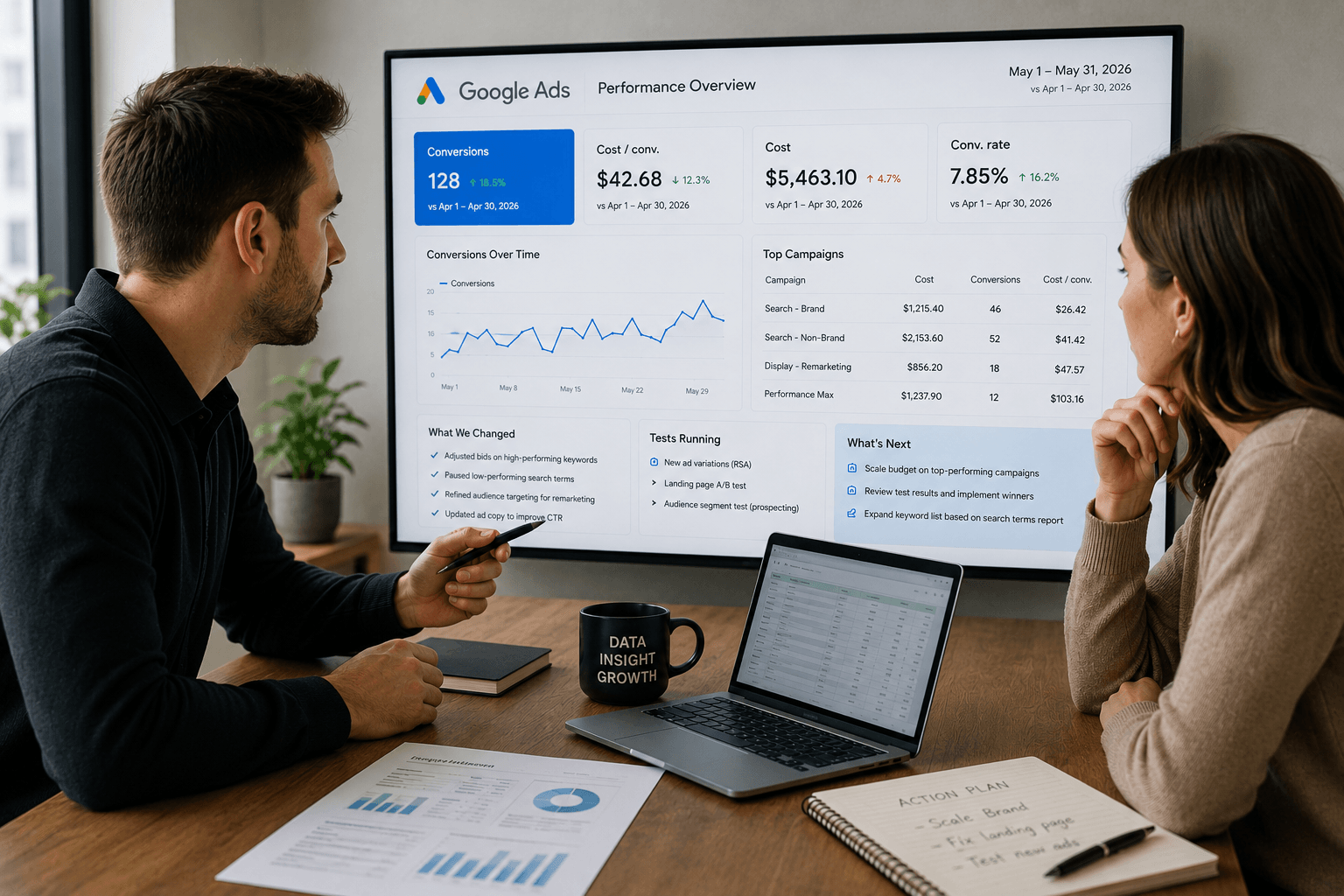
The Real Purpose of Google Ads Reporting (It’s Not What Most Agencies Think)
Most agencies treat reporting like a recap.
Here’s what happened last month.
Here are your numbers.
We’ll talk again next month.
But that’s not what reporting is supposed to do.
A good Google Ads report isn’t a summary.
It’s a decision-making tool.
It should help you understand:
- What’s driving results
- What’s wasting budget
- What changed
- What needs to happen next
Anything less than that?
You’re just looking at a dashboard.
Why Businesses Choose Digital Division for Google Ads Management
Paid search isn’t just about running ads.
It’s about making the right decisions with your budget.
1. Focused on ROI, Not Just Traffic
Clicks don’t pay the bills.
We focus on generating leads and revenue—not just traffic.
2. Smarter Budget Allocation
More spend doesn’t always mean better results.
We help you invest where it actually makes an impact.
3. Full Transparency
Know exactly where your money is going.
No hidden fees. No confusing reports.
4. Continuous Optimization
Campaigns aren’t “set and forget.”
We actively test, refine, and improve performance.
5. Strategy Behind Every Campaign
Every campaign is built with a clear purpose tied to your goals.
6. A True Growth Partner
We don’t just manage ads.
We help guide your overall marketing strategy.
Average vs Great Reporting (Quick Breakdown)
| Type of Reporting | What You Get | What’s Missing |
| Basic Agency Report | Clicks, impressions, spend | No context |
| “Good” Report | Conversions, CPA, some insights | Limited strategy |
| Great Report (What You Should Expect) | Performance + insights + actions | Nothing hidden |
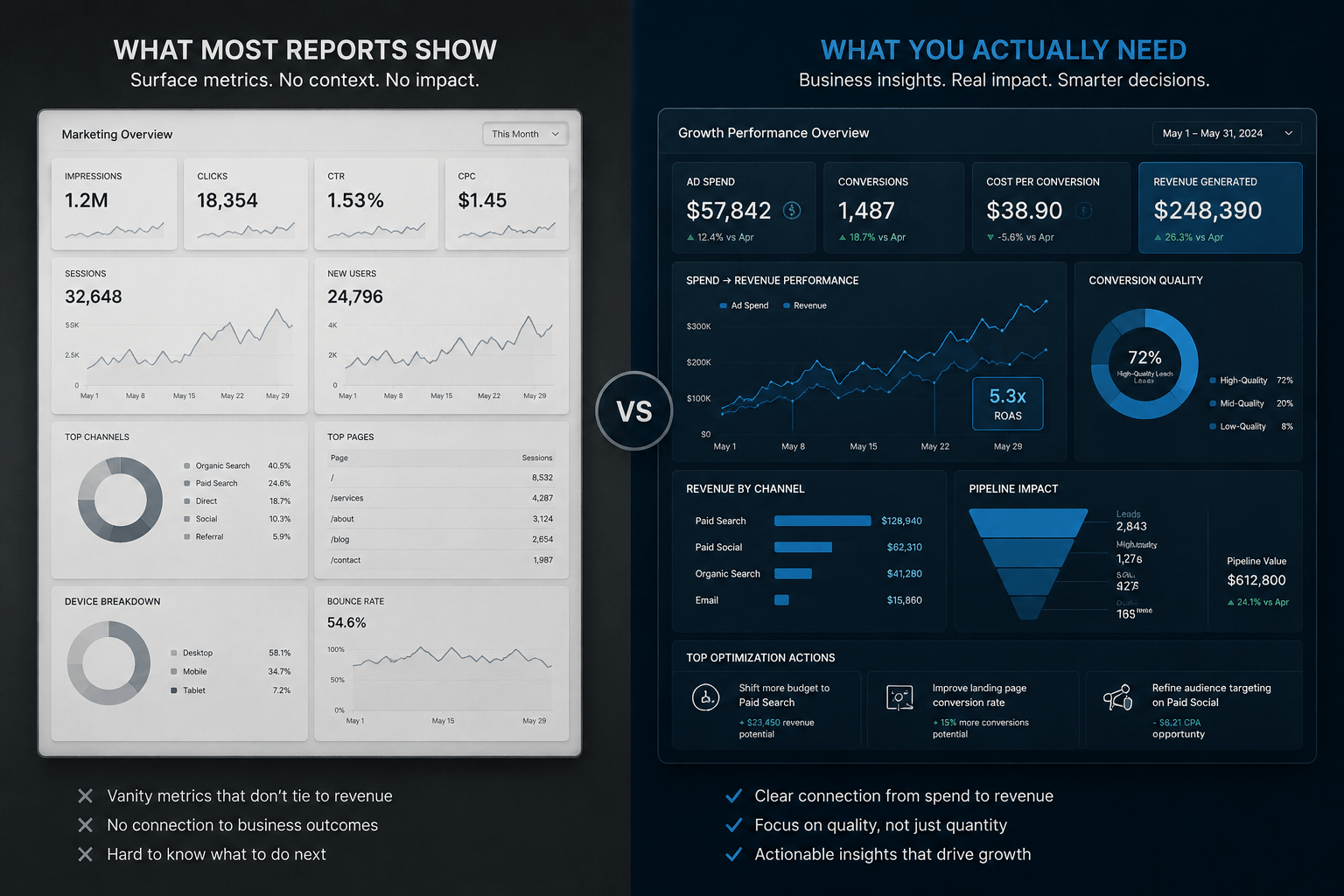
What Great Reporting Actually Does
A strong Google Ads report should do 3 things every single month:
1. Create Clarity
You should immediately understand:
- Where your money is going
- What’s working
- What’s not
No digging. No guessing.
2. Ensure Accountability
Your agency should be able to answer:
- What did you change this month?
- Why did you make those changes?
- What impact did they have?
If that’s not clear…
You’re not getting real management.
3. Drive Next Steps
Every report should end with direction:
- What are we testing next?
- Where can we scale?
- What needs to be fixed?
Because the goal isn’t to report on performance.
The goal is to improve it.
The Bottom Line
Most agencies send reports to check a box.
The best agencies use reporting to:
- Guide strategy
- Improve performance
- Help you make better business decisions
What Every Google Ads Report Should Include (The Baseline)
Before we get into what great reporting looks like…
Let’s start with the basics.
These are the non-negotiables.
If your report doesn’t include these, you don’t have real visibility into your campaigns.
The Core Metrics (Table Stakes)
At a minimum, your report should clearly show:
| Metric | Why It Matters |
| Ad Spend | Where your budget is going |
| Conversions | What results you’re getting |
| Cost per Conversion | How efficient your campaigns are |
| Conversion Rate | How well traffic turns into leads |
| Clicks / CTR | Engagement and ad relevance |
These metrics give you a baseline understanding of performance.
But on their own?
They’re not enough.
Performance Should Be Broken Down (Not Blended Together)
One total number doesn’t tell you anything.
You need to see where results are coming from.
At minimum, your report should break down performance by:
- Campaign
- Ad group
- Keyword (or search intent)
- Device (mobile vs desktop)
Example: Why This Matters
Let’s say your report shows:
- 48 conversions
- $177 cost per conversion
Sounds solid.
But when you break it down?
- One campaign might be generating leads at $80
- Another might be spending hundreds with zero conversions
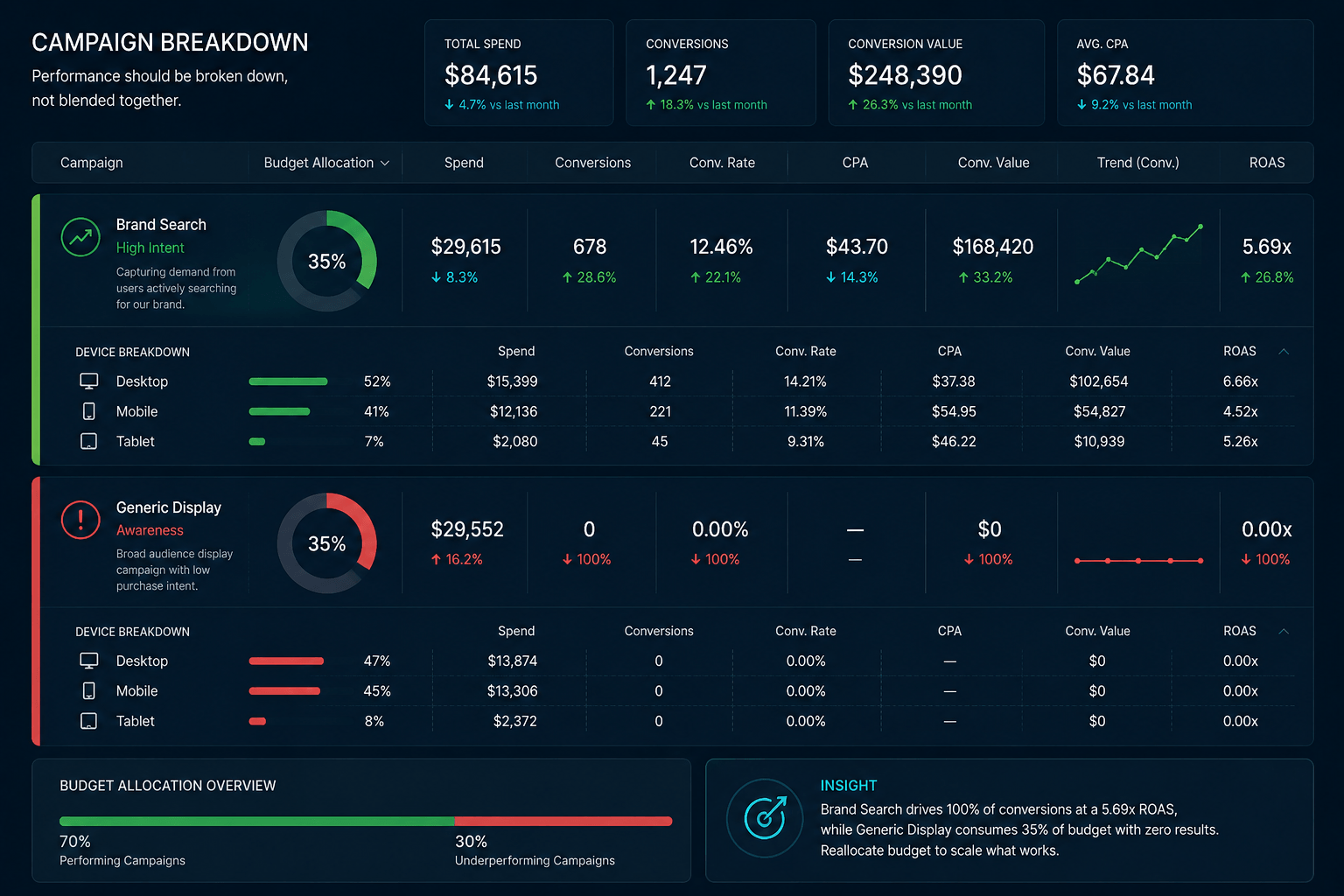
This is exactly why campaign-level reporting matters.
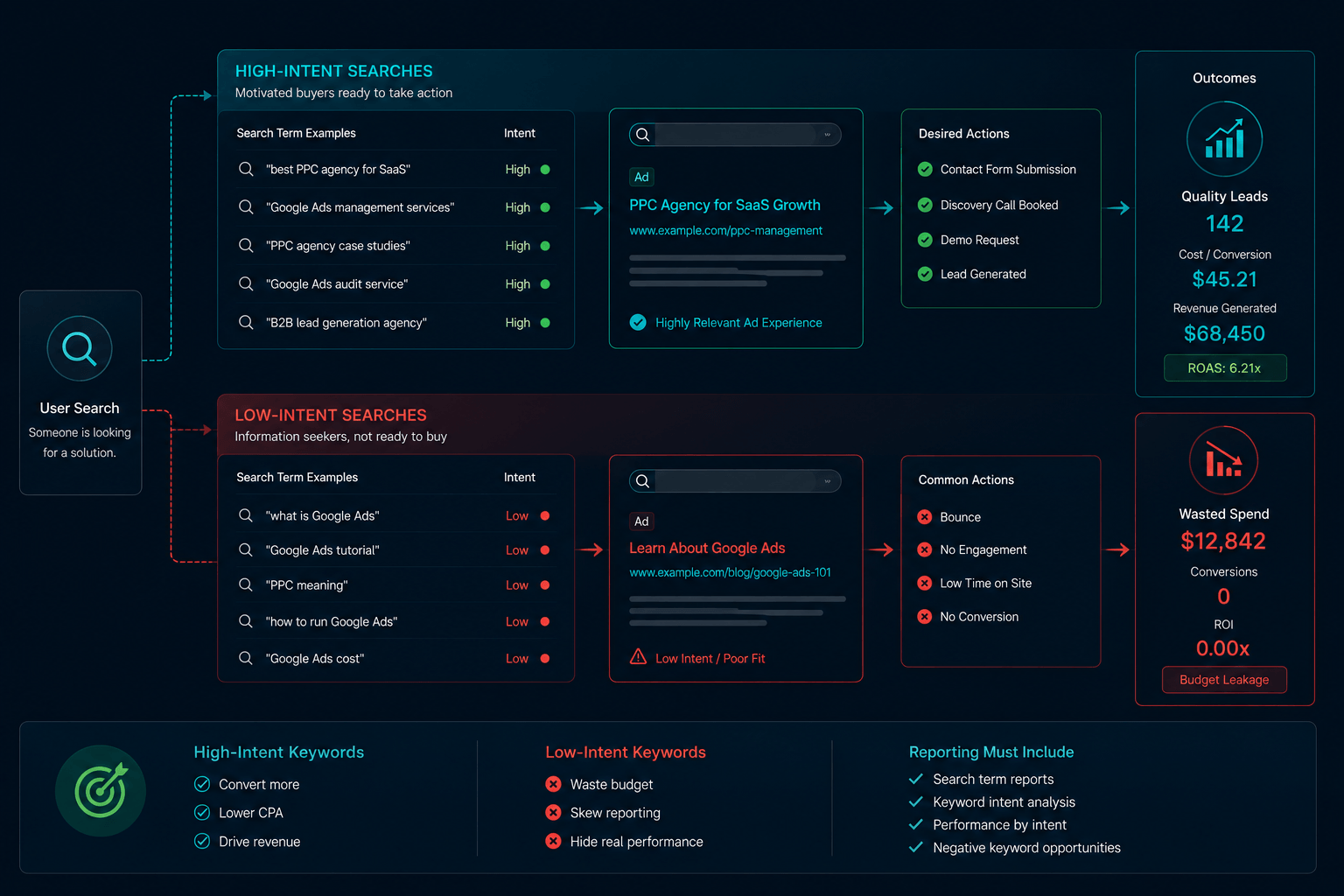
Keyword & Search Term Visibility Is Critical
This is one of the most overlooked areas in reporting.
Your agency should show you:
- Which keywords are driving conversions
- Which ones are just driving clicks
- What people are actually searching before clicking your ad
Why this matters:
Because not all traffic is equal.
Some keywords:
- Bring in high-quality leads
Others:
- Burn budget with zero return
Trend Data: Performance Over Time
A single snapshot doesn’t tell the full story.
Your report should also include:
- Daily or weekly trends
- Changes in conversions, cost, CTR, and CPC over time
Why this matters:
Because performance isn’t static.
Some days convert better than others.
Costs fluctuate.
Opportunities emerge.
Quick Recap: The Baseline
At a minimum, your Google Ads report should include:
- Clear KPI summary (spend, conversions, CPA)
- Campaign-level performance
- Keyword and search term insights
- Trend data over time
If any of these are missing…
You’re not seeing the full picture.
What Most Agencies Don’t Show (But You Should Expect)
Here’s where things start to get interesting.
Because most agencies will show you some data…
But very few will show you the full picture.
And that’s where businesses lose money without realizing it.
Below are the things a great Google Ads agency should be showing you every month—but most don’t.
1. Where Your Money Actually Goes (Full Spend Transparency)
This sounds obvious.
But it’s one of the biggest gaps in the industry.
You should know:
- Are you paying Google directly?
- How much is going to ad spend vs management fees?
- What’s your real cost per lead?
Because without that clarity…
You don’t actually know what you’re paying for.
We’ve seen situations where:
- A company thinks they’re paying $500 per lead
- When in reality, leads are being generated for closer to $100
The difference?
Lack of transparency.
2. What a “Conversion” Actually Means
Not all conversions are created equal.
And this is where reporting can get misleading—fast.
Here’s the difference:
| Type | Real Value |
| Click counted as conversion | Misleading |
| Multiple actions from same user | Inflated |
| Form fill / phone call | Real lead |
What you should expect from your agency:
- Clear definition of a conversion
- Visibility into conversion types (calls vs forms vs other)
- Explanation of whether conversions are unique or duplicated
3. What’s Actually Working vs What’s Wasting Budget
Most reports highlight wins.
Very few highlight waste.
But this is where the real optimization happens.
A strong report should clearly show:
What’s working:
- Campaigns driving conversions efficiently
- High-performing keywords
- Strong conversion rates
What’s not:
- Campaigns with high spend and low/no conversions
- Keywords generating clicks but no leads
- Inefficient cost per conversion
Why this matters:
Because improving performance isn’t just about scaling what works.
It’s about eliminating what doesn’t.
4. Missed Opportunities (Not Just Results)
Most agencies report on what happened.
The best agencies show what could happen.
This includes:
- Untapped demand
- Budget limitations
- Ranking limitations
- Campaigns that could scale
Example:
If your Search Impression Share is 42%…
That means you’re missing more than half of potential visibility.
That’s not just a metric.
That’s an opportunity conversation.
5. What Your Agency Actually Did This Month
This is one of the biggest red flags in reporting.
You get numbers…
But no explanation.
A real report should answer:
- What changes were made?
- Why were they made?
- What impact did they have?
Examples of what should be included:
- Bid adjustments
- Budget reallocations
- New campaigns or ad groups
- Keyword additions or removals
- Negative keyword updates
If you don’t see this?
You don’t know if your account is being actively managed.
6. What’s Being Tested (And What Comes Next)
Google Ads performance improves through testing.
Not guesswork.
Your report should include:
- What’s being tested (ads, landing pages, targeting)
- Why it’s being tested
- What success looks like
- What happens next
Why this matters:
Because a stagnant account = declining performance.
Quick Summary: What Most Reports Miss
- Spend transparency
- Conversion accuracy
- Waste identification
- Growth opportunities
- Change tracking
- Testing strategy
Miss these…
And you’re not getting real insight.
Want to See What Your Current Agency Might Be Missing?
Most of these gaps don’t show up unless you know where to look.
We’ll walk through your account and show you:
- Where performance is being limited
- Where budget is being wasted
- What opportunities exist to improve results
Request a Free Google Ads Audit and get full visibility into your campaigns.
What a Great Google Ads Report Actually Looks Like
At this point, you know what most agencies show…
And what they don’t.
So what does a complete, high-quality report actually look like?
Here’s the standard you should expect.
1. A Clear KPI Snapshot (No Guesswork Required)
At the top of every report, you should see a clean, high-level summary of performance.
Example of what this includes:
- Total ad spend
- Total conversions
- Cost per conversion
- Conversion rate
- Clicks, CTR, CPC
Why this matters:
Because you shouldn’t have to dig through pages of data to answer one question:
“Are we performing well or not?”
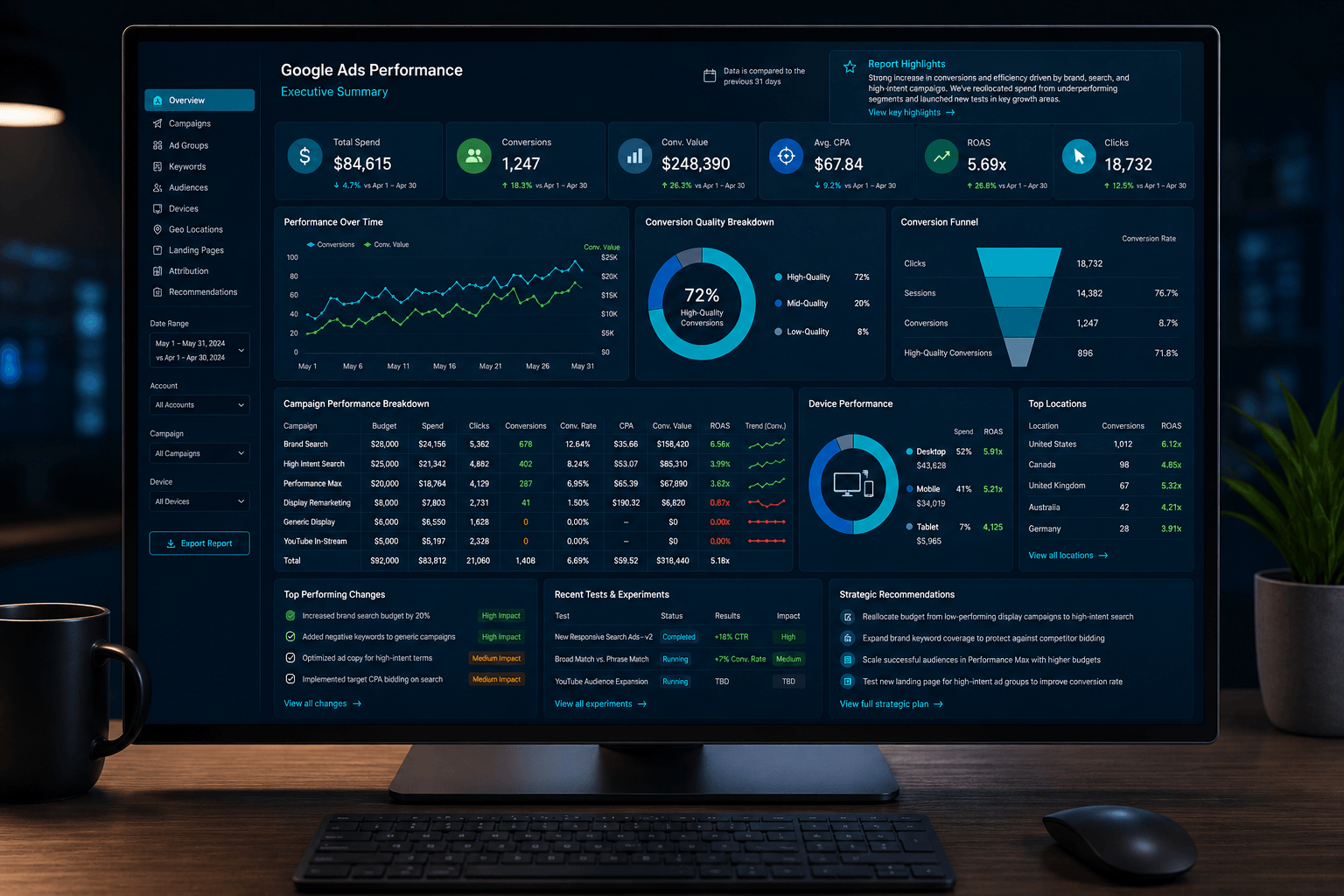
2. Deep Performance Breakdown (Where Results Actually Come From)
High-level metrics are just the starting point.
A strong report should let you drill down into:
- Campaign performance
- Ad group performance
- Keyword-level results
- Device breakdown (mobile vs desktop)
What this unlocks:
- Identify your best-performing segments
- Spot underperforming areas quickly
- Make smarter budget decisions
3. Conversion Quality (Not Just Quantity)
More conversions ? better performance.
What matters is what those conversions actually are.
A strong report should show:
- Calls vs form fills
- Different lead sources
- Conversion actions clearly separated
| Conversion Type | What It Tells You |
| Calls | High intent |
| Form submissions | Lead generation |
| Other actions | Lower intent / assist |
4. Performance Trends Over Time
A snapshot tells you what happened.
Trends tell you what’s changing.
Your report should include:
- Daily or weekly performance trends
- Cost fluctuations
- Conversion spikes and dips
Why this matters:
Because performance isn’t linear.
- Some days outperform others
- Costs fluctuate
- Campaign changes take time to settle
Without trends…
You’re making decisions in the dark.
5. Device & Behavior Insights
Not all users behave the same.
A strong report should show:
- Mobile vs desktop performance
- Conversion distribution by device
6. A Clear Link to Strategy (Beyond Just Ads)
This is where most agencies stop.
And where great agencies stand out.
A real report should connect performance to:
- Landing page performance
- Conversion rates
- Audience targeting
- Overall marketing strategy
Because Google Ads doesn’t exist in a vacuum.
A strong agency doesn’t just run ads.
They help improve the entire funnel.
Quick Breakdown: What “Great” Looks Like
| Element | Basic Report | Great Report |
| KPIs | X | X |
| Campaign breakdown | X | X |
| Conversion quality | - | X |
| Trends over time | - | X |
| Strategy insights | - | X |
The Takeaway
A great Google Ads report doesn’t overwhelm you with data.
It helps you understand:
- What’s happening
- Why it’s happening
- What to do next
Red Flags in Google Ads Reporting (That Should Immediately Concern You)
By now, you know what good reporting looks like.
So let’s flip it.
Here are the signs your Google Ads reporting—and possibly your agency—isn’t where it should be.
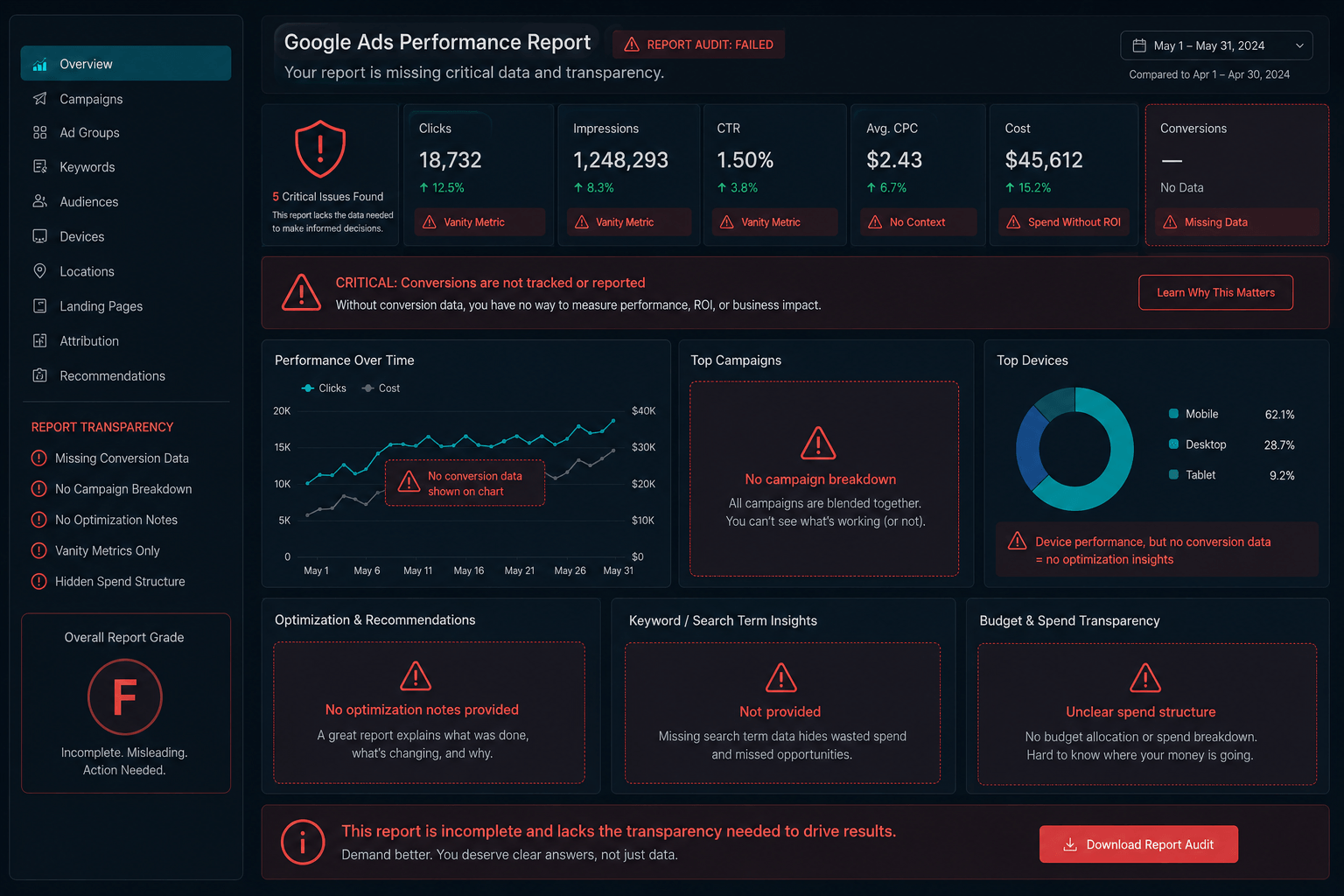
Red Flag #1: No Conversions in the Report
This is a big one.
If your report shows:
- Clicks
- Impressions
- Spend
…but no conversions?
You don’t have proper tracking.
And without tracking:
You have no idea what’s actually working.
Red Flag #2: Vague or Surface-Level Metrics
If your report looks like this:
- “Traffic increased”
- “Clicks are up”
- “Performance is improving”
But doesn’t show:
- Cost per conversion
- Conversion rate
- Actual lead volume
Then you’re looking at vanity metrics.
Quick comparison:
| Metric Type | Useful? |
| Clicks | Context only |
| Impressions | Context only |
| Conversions | Yes |
| Cost per conversion | Critical |
Red Flag #3: No Breakdown of Performance
If everything is blended into one total:
- One CPA
- One conversion number
- One spend number
You’re missing the real story.
Because inside that total:
- Some campaigns are working
- Some are wasting money
Without breakdowns, you can’t tell the difference.
Red Flag #4: No Explanation of What Changed
You get a report…
But no context.
No notes.
No insights.
No explanation.
You should be asking:
- What did you change this month?
- Why did you change it?
- What happened as a result?
If those answers aren’t in the report…
You don’t know if your account is being actively managed.
Red Flag #5: No Mention of Testing or Optimization
Google Ads performance improves through testing.
So if your report doesn’t mention:
- A/B testing
- New ads
- Landing page changes
- Strategy adjustments
That’s a problem.
It usually means one of two things:
- Nothing is being tested
- Or nothing meaningful is happening
Red Flag #6: No Transparency in Spend or Account Access
This one goes beyond reporting—but shows up in it.
Watch for:
- No clear breakdown of ad spend vs fees
- You don’t pay Google directly
- You don’t have full account access
These are all signs of low transparency.
And in some cases, inflated costs.
Red Flag #7: “We’ll Get You More Leads” (With No Strategy)
This is more common than you’d think.
If your reporting (and communication) sounds like:
- “We’re getting more leads”
- “Things are improving”
- “We’ll keep optimizing”
…but doesn’t explain:
- How performance is improving
- What strategy is driving it
- What comes next
Then you’re not getting real insight.
Quick Red Flag Checklist
If your report is missing any of these…
- No conversions
- No CPA or efficiency metrics
- No campaign/keyword breakdown
- No explanation of changes
- No testing or optimization insights
- No transparency in spend
- No clear strategy
It’s time to ask questions.
The Bottom Line
A report should give you confidence.
If it leaves you with more questions than answers…
That’s a problem.
Seeing Any of These Red Flags in Your Reports?
If even a few of these sound familiar…
It’s worth taking a closer look.
We’ll review your account and give you:
- Honest feedback on performance
- Clear insight into what’s working and what’s not
- Actionable recommendations to improve results
Get a Free Google Ads Audit — no pressure, just clarity.
Frequently Asked Questions About Google Ads Reporting
What should a Google Ads report include?
At a minimum, a Google Ads report should include:
- Ad spend
- Conversions
- Cost per conversion (CPA)
- Conversion rate
- Campaign-level performance
- Keyword or search term insights
But strong reporting goes further.
It should also show:
- What’s working vs what’s not
- What changes were made
- What opportunities exist
- What happens next
How often should I receive a Google Ads report?
Most agencies provide monthly reports.
That’s standard.
But frequency matters less than quality and clarity.
A strong agency will:
- Provide monthly deep dives
- Monitor performance continuously
- Communicate changes and insights throughout the month
Reporting shouldn’t be the only time you hear from your agency.
What is the most important metric in Google Ads reporting?
There isn’t just one.
But the most important metrics are:
- Conversions (results)
- Cost per conversion (efficiency)
If you’re more advanced, you may also look at:
- Revenue
- Return on ad spend (ROAS)
- Lead quality or pipeline
Clicks and impressions matter—but only as supporting metrics.
Why do some agencies avoid showing conversions?
Usually, it comes down to tracking.
Either:
- Conversion tracking isn’t set up properly
- Or it’s set up in a way that inflates results
Some agencies also focus on clicks or traffic because:
It’s easier to make those numbers look good.
But without conversion tracking…
You can’t measure real performance.
What’s the difference between a lead and a conversion?
This is where things can get confusing.
A conversion is any tracked action.
A lead is a meaningful business outcome.
Example:
| Action | Conversion? | Lead? |
| Click on ad | - | - |
| Form submission | X | X |
| Phone call | X | X |
| Multiple actions from same user | X | Maybe |
Not all conversions are equal.
A good report should clarify what actually counts.
Should I have access to my Google Ads account?
Yes. Always.
You should:
- Own your account
- Have full access
- Be able to see spend and performance directly
If you don’t…
That’s a red flag.
Lack of access often means lack of transparency.
Do I have to use the same agency for strategy and execution?
No.
A good agency should be able to provide strategy without requiring execution.
In fact:
- Some businesses already have internal teams
- Some work with multiple vendors
A strong partner focuses on what’s best for your business—not locking you into services.
That said, having both strategy and execution aligned can often lead to better results—because everything works toward the same goal.
Why does my cost per lead fluctuate month to month?
This is normal.
Google Ads performance can vary due to:
- Competition changes
- Search demand shifts
- Budget adjustments
- Ongoing testing and optimizations
That’s why trend data matters more than a single snapshot.
How do I know if my agency is doing a good job?
Your report should answer these questions clearly:
- Are we generating real leads or revenue?
- Is performance improving over time?
- Do we know what’s working and what’s not?
- Is there a clear strategy behind the account?
- Are we testing and optimizing consistently?
If the answer to any of these is unclear…
You should ask questions.
The Bottom Line: A Report Should Give You Clarity—Not Just Data
Most Google Ads agencies send reports.
But very few give you what you actually need.
Because a real report shouldn’t just show numbers.
It should answer:
- Where is my money going?
- What’s actually driving results?
- What’s wasting budget?
- Are these real, qualified leads?
- What is being improved—and what happens next?
If your report isn’t doing that…
You’re not getting the full picture.
What You Should Expect From Your Agency (Quick Recap)
A strong Google Ads agency should provide:
- Transparent reporting on spend and performance
- Clear, accurate conversion tracking
- Visibility into what’s working—and what’s not
- Ongoing testing and optimization
- Strategic insight, not just data
Anything less than that?
You’re not getting real management.
You’re getting reporting for the sake of reporting.
And That’s Where Most Agencies Fall Short
They focus on:
- Metrics over meaning
- Activity over strategy
- Reports over results
But Google Ads doesn’t reward activity.
It rewards strategy, clarity, and continuous improvement.
If You’re Not Sure Your Agency Is Doing This Right…
That’s usually a sign.
And it’s worth taking a closer look.
Get a Second Opinion on Your Google Ads Account
If you want clarity on what’s actually happening in your account…
We can help.
We’ll walk through:
- Your current performance
- What’s working (and what’s not)
- Where budget is being wasted
- What opportunities exist to improve results
No pressure. No commitment.
Just a clear, honest breakdown of where things stand.
Book a free Google Ads audit and we’ll review your account with you.
DIGITAL MARKETING SOLUTIONS
Relax.
You've got a digital marketing partner.
Digital Division is a marketing agency with solutions that can help you generate leads and transform your business.