

Google Search ads didn’t just evolve.
They transformed.
Ten years ago, ads were mostly static text blocks.
You wrote the copy. Google showed it.
Today, ads are dynamic systems.
You provide inputs. Google assembles the final experience.
Headlines change.
Images rotate.
Layouts adapt.
And in some cases, Google AI pulls content directly from your website to build the ad.
This post breaks down how Google Ads in search results changed visually and structurally over the last decade.
With screenshots.
And with context that actually matters.

The Big Shift (In One Sentence)
Google Search ads moved from fixed text placements to AI-assembled, asset-driven experiences that blend into the SERP.
Everything else flows from that.

The Quick Answer (For Skimmers)
If you only read one section, read this.
Over the last 10+ years, Google Search ads have:
- Become harder to visually distinguish from organic results
- Moved from static copy to dynamically assembled ads
- Expanded from text-only to include images, logos, links, and forms
- Shifted prime visibility to the top of the page
- Started appearing inside AI-generated answers
- Begun using your website content to generate ad creatives
- Given advertisers less manual control and Google more decision-making power
This didn’t happen overnight.
It happened one redesign at a time.
Why This Matters (Especially Now)
Most people still think of Google Ads as “text ads with extensions.”
That mental model is outdated.
Modern search ads behave more like:
- modular layouts
- responsive components
- AI-curated displays
And that changes:
- how ads are written
- how landing pages are built
- how performance is optimized
To understand where Google Ads are going next, you need to see how they got here.
Let’s rewind.
A Visual Timeline of Google Search Ads (2014 — Today)
Google rarely announces big ad changes as “turning points.”
Most shifts happen quietly.
Through design tweaks.
Through layout tests.
Through small UI changes that add up.
This timeline focuses on what users actually see in search results.
Because that’s where behavior changes.
2014: The “Ad” Label Replaces Shaded Backgrounds
Before 2014, Google used background shading to separate ads from organic results.
It was obvious.
Ads looked different.
Then Google removed the shading.
In its place: a small yellow “Ad” label next to the headline.
Same position.
Same text format.
Much less visual separation.
This was the first major step toward ads blending into organic results.
- No more colored background behind ads
- Ads shared the same white background as organic listings
- Only a small “Ad” label differentiated paid vs organic
- Ads became easier to miss as “ads”
- Users scanned headlines instead of labels
- Click behavior started to normalize between paid and organic results
This set the tone for everything that followed.
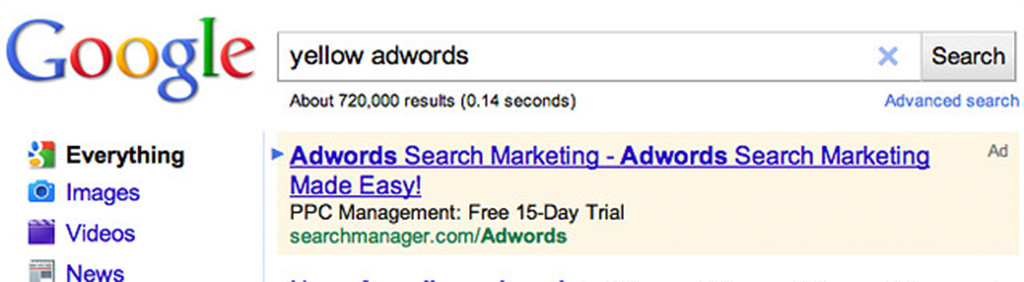
Google Ads from 2011 - Image Source: Search Engine RoundTable
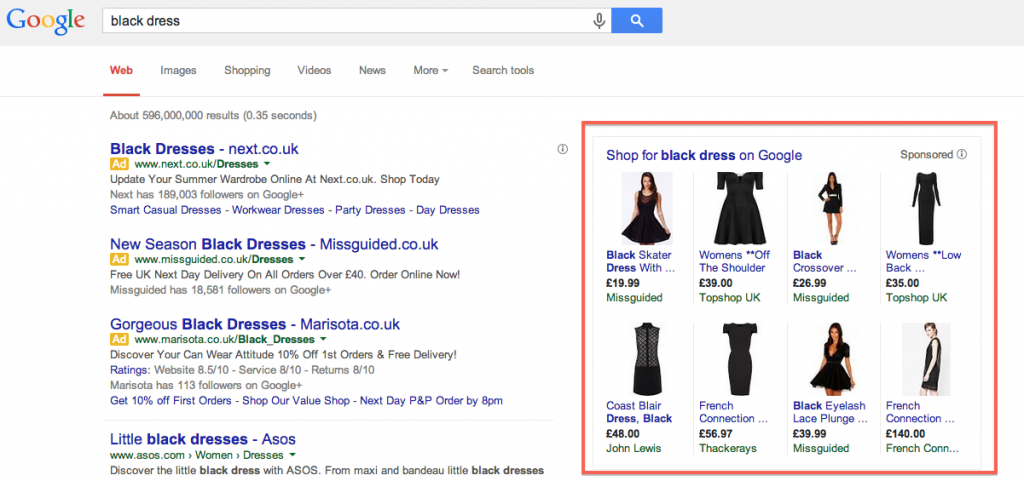
Google Ads from 2014 - Image Source: Clickoo
2016: Right-Side Ads Disappear (Desktop Becomes Mobile)
In early 2016, Google removed right-hand sidebar ads on desktop search.
This was a major layout reset.
Desktop search started to look like mobile search:
- One main column
- Ads concentrated at the top
- Organic results pushed further down
Overnight, “above the fold” became more competitive.
- No more ads on the right side of desktop SERPs
- Up to four ads stacked at the top of the page
- Bottom-of-page ads became more common
- The top of the page became the most valuable real estate
- Ads needed to work harder to stand out
- Google had more incentive to make ads larger and richer
This change directly paved the way for bigger ad formats.
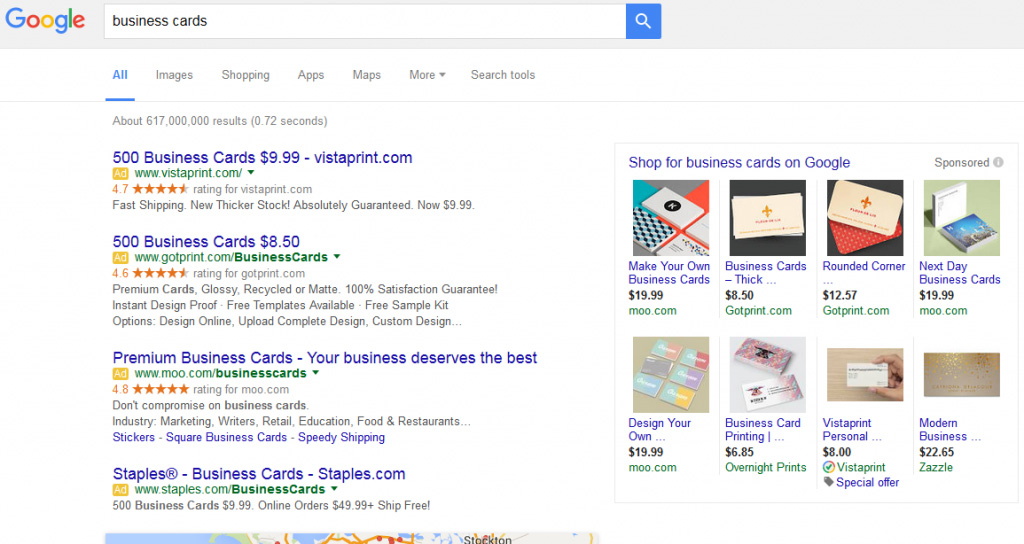
Google Ads from 2016 - Image Source: The SEM Post
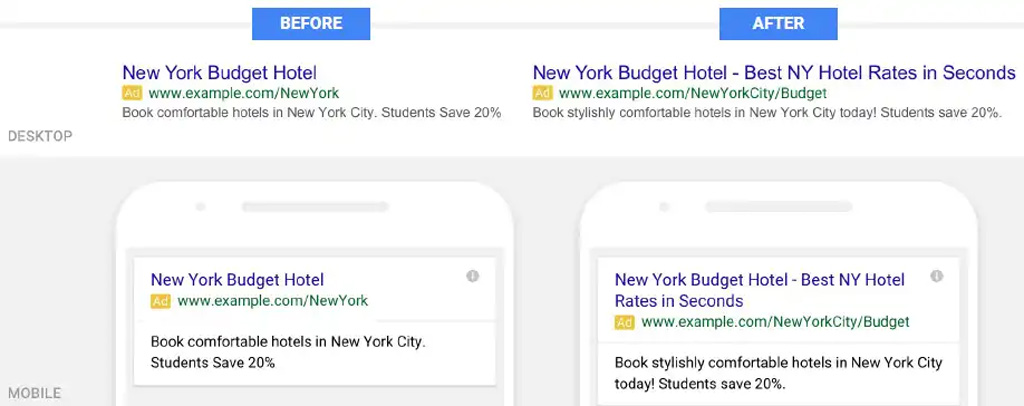
Image Source: Edge45
2016–2018: Ads Get Bigger With Expanded Text Ads
After removing right-side ads, Google expanded the size of text ads themselves.
Expanded Text Ads introduced:
- More headlines
- Longer descriptions
- More horizontal space
Ads didn’t just get taller.
They got louder.
- Multiple headlines instead of one
- Longer descriptions
- More screen space per ad
- Ads dominated the top of the page
- Organic results were pushed further down
- The line between “ad” and “result” continued to blur
But this was only a temporary step.
Because Google was about to stop letting advertisers control the final version of the ad.
2018: Ads Stop Being Written and Start Being Assembled
- AdWords Becomes Google Ads
In 2018, Google introduced Responsive Search Ads.
This wasn’t a design tweak.
It was a structural change.
Instead of writing one ad, advertisers now provide:
- multiple headlines
- multiple descriptions
Google then mixes and matches them.
Every auction can produce a different version of the same ad.
- The same advertiser could show different headlines to different users
- Ad layouts adapted to screen size and context
- No single “final” version of the ad existed anymore
Two people could search the same keyword.
And see different ad copy.
- Google took control of creative assembly
- Advertisers shifted from writing ads to supplying components
- Testing moved from manual A/B tests to algorithmic optimization
This was the moment search ads became dynamic by default.
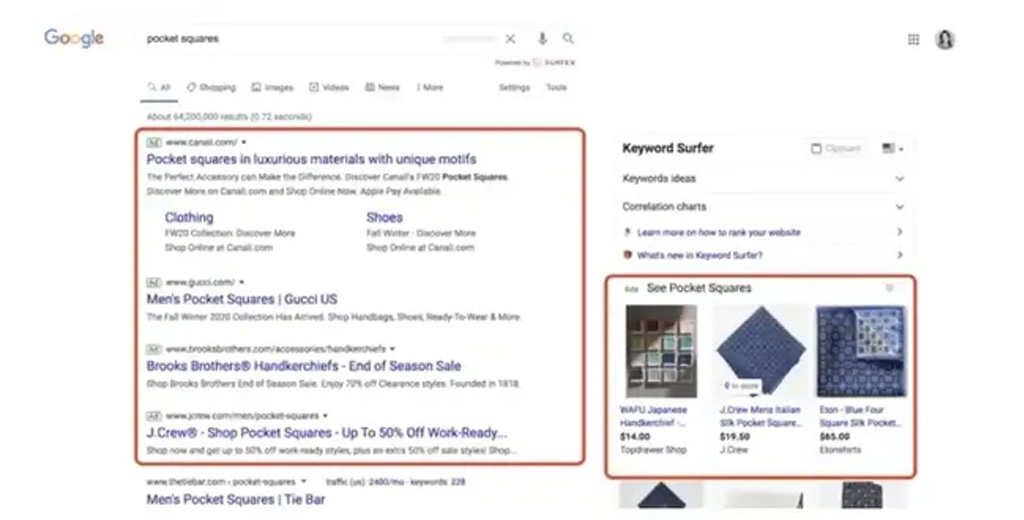
Image Source: Hubspot
2020: Ads and Organic Results Start to Look the Same
In 2020, Google redesigned desktop search.
And it borrowed heavily from mobile.
Organic results gained:
- favicons
- brand-first layouts
- cleaner visual hierarchy
Ads received the same treatment.
- Favicons appeared next to both ads and organic listings
- The “Ad” label moved into the same visual row as the domain
- Paid and organic results shared nearly identical structures
Scanning search results became brand-driven, not link-driven.
- Users focused on brand recognition, not URLs
- Ads blended even further into organic listings
- Trust signals shifted from position to familiarity
At this point, the difference between an ad and an organic result was mostly semantic.
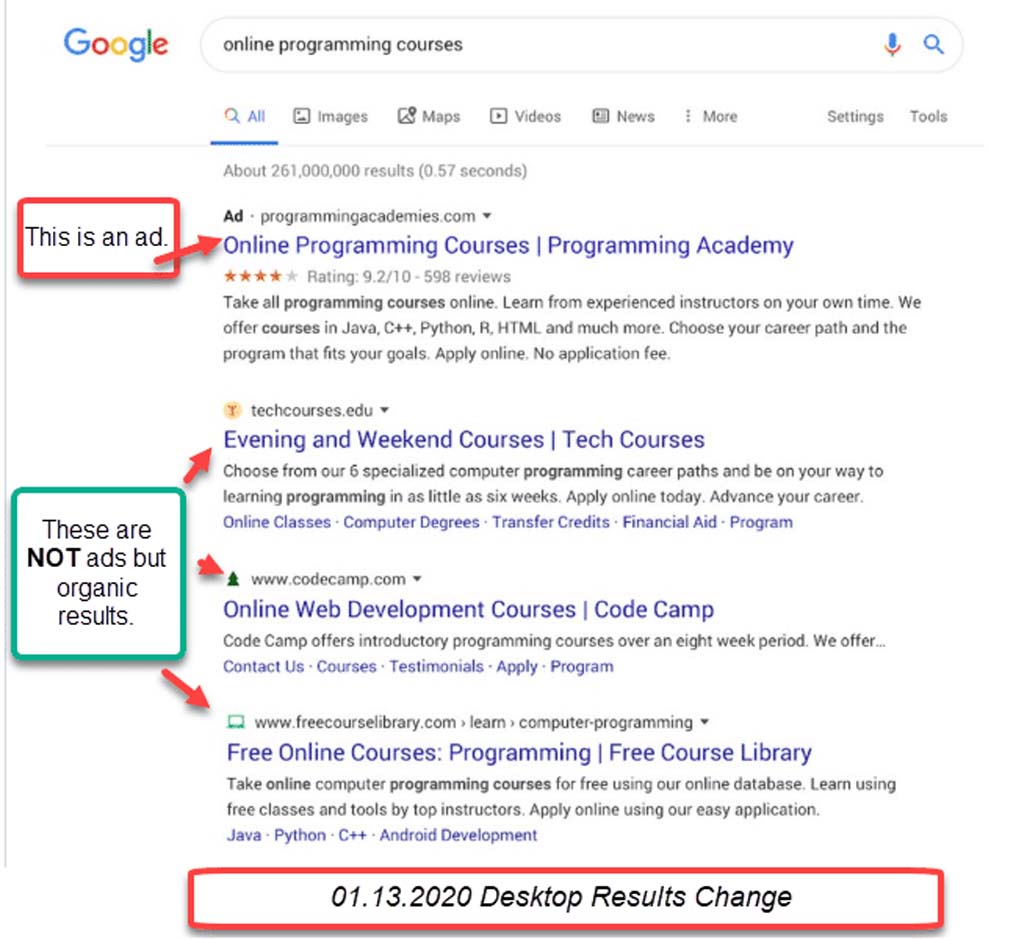
Image Source: 3 Aspens Media
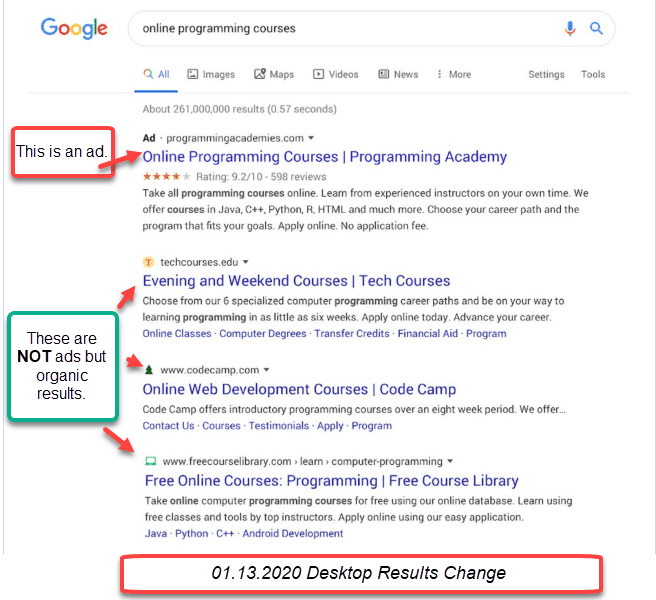
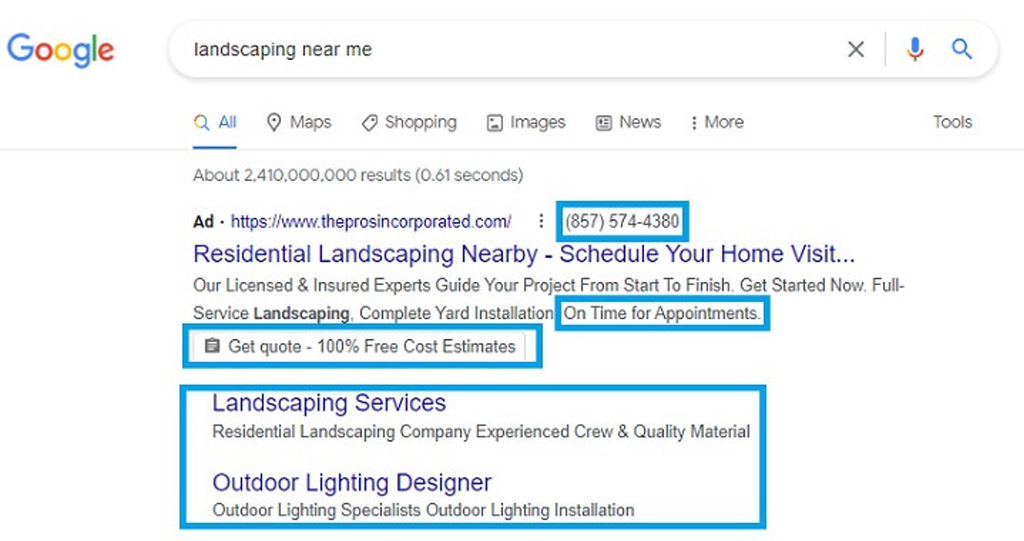
Image Source: Wordstream
2022: “Ad Extensions” Become “Assets”
In 2022, Google renamed ad extensions to assets.
It sounded cosmetic.
It wasn’t.
Assets aren’t add-ons.
They’re building blocks.
- Ads expanded with sitelinks, callouts, highlights, and more
- Ad size varied dynamically from one search to another
- Some ads occupied significantly more vertical space than others
Two ads from different advertisers could look completely different.
Even for the same query.
- Ad layout became fluid, not fixed
- Google decided which assets showed and when
- The ad unit started behaving like a mini landing page
This set the stage for the most visible shift yet.
2023–2025: Images, Logos, and Website-Generated Creatives Enter Search Ads
For most of its history, Search ads were text-only.
That’s no longer true.
Google began turning search ads into visual, brand-forward units.
Not by asking advertisers to design layouts.
But by asking for assets.
Images Appear Inside Search Ads
Google introduced image assets for Search campaigns.
Advertisers could upload images.
Google decided when to show them.
Sometimes they appear.
Sometimes they don’t.
It depends on the query, the device, and the auction.
- Search ads could include images alongside text
- Ads occupied more screen space
- Results started to resemble rich cards instead of links
Text ads stopped looking like text ads.
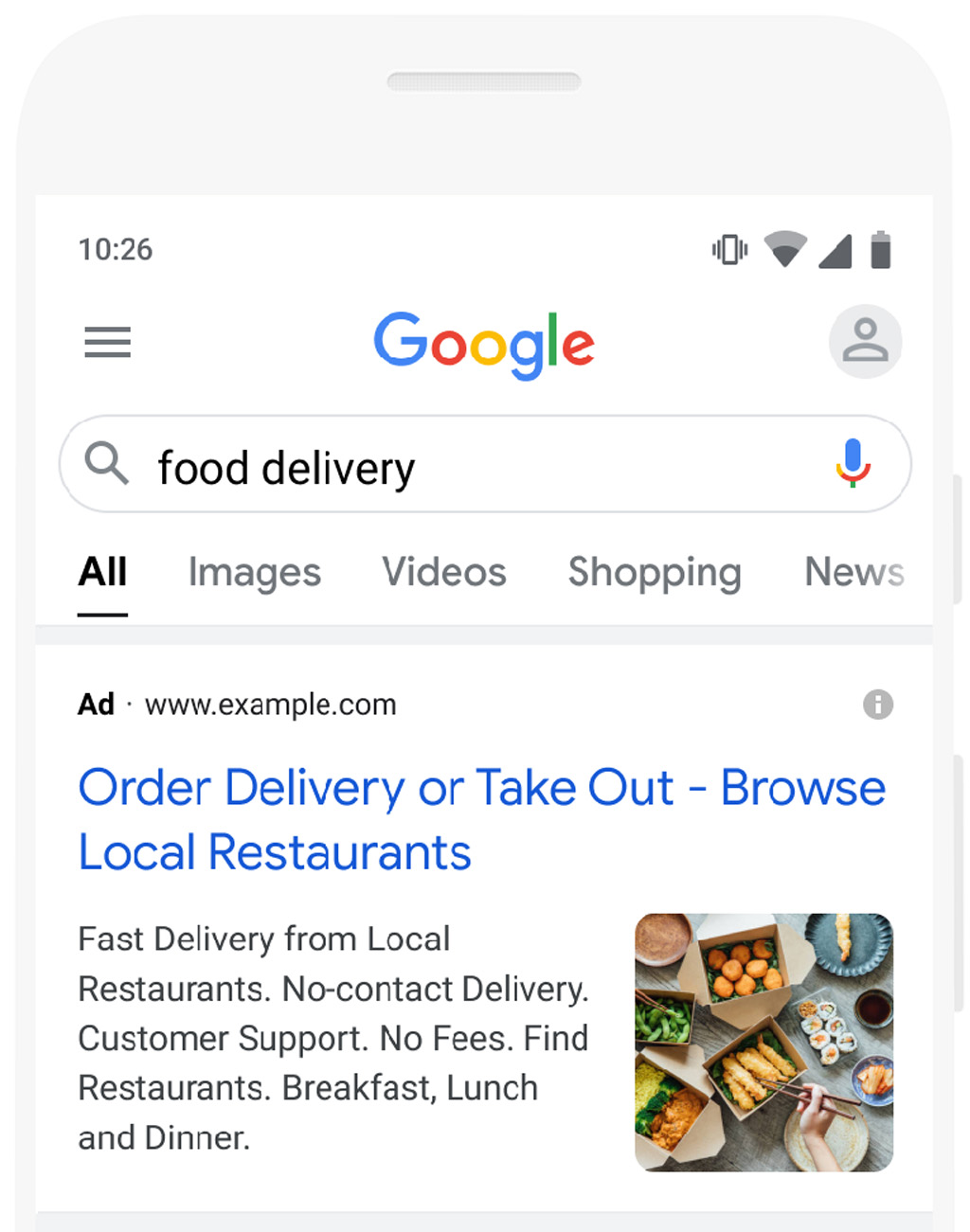
Image Source: Google Help

Logos and Business Names Become Part of the Ad
Google also added business name and logo assets.
This changed how users scan results.
Instead of reading headlines first, users could:
- recognize brands instantly
- associate ads with known businesses
- trust results based on familiarity, not position
- Logos appeared next to ad headlines
- Brand names became more prominent than URLs
- Ads leaned into recognition, not explanation
Search results became brand-led.
When Google Pulls Creative From Your Website
This is where things really change.
With Dynamic Search Ads, Google doesn’t just show your ad.
It crawls your website.
Then it:
- matches queries to relevant pages
- generates headlines automatically
- chooses landing pages dynamically
You don’t write the headline.
Your site does.
Google extended this further with dynamic image assets, which can pull visuals directly from landing pages to support Search ads.
- Headlines clearly derived from on-page content
- Images sourced from advertiser websites
- Ads that look custom-built for each search
This is no longer “copywriting.”
It’s content interpretation.

The Ad Is Now an Output, Not an Input
By this point, a Search ad is no longer something you finish writing.
It’s something Google assembles.
You provide:
- headlines
- descriptions
- images
- logos
- landing pages
Google builds the display.
And that leads directly to the next shift.
2024–2026: Ads Move Into AI Answers (And Users Get New Controls)
For years, ads lived around search results.
Above them.
Below them.
Next to them.
That boundary is gone.
With the rollout of AI Overviews and AI-powered search experiences, ads entered a new space: the answer itself.
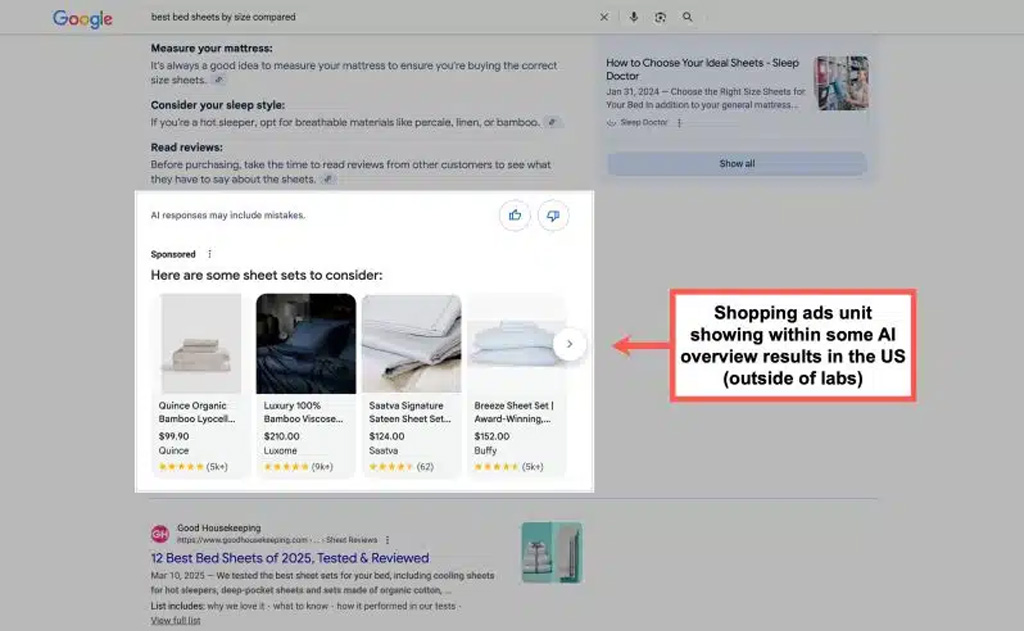
Image Source: Search Engine Land
Ads Appear Inside AI-Generated Answers
Google now allows Search ads to appear:
- above AI Overviews
- below AI Overviews
- or within AI Overviews
Not all at once.
But contextually.
If a query shows commercial intent, Google may surface sponsored content directly alongside AI-generated explanations.
- Ads appear inside conversational, paragraph-style answers
- Sponsored content sits closer to decision-making moments
- The traditional “top of results” concept becomes less clear
Search stops looking like a list.
It starts looking like a response.
And ads adapt to that format.
The Display Is Fully Google-Controlled
At this point, advertisers no longer control:
- the exact copy
- the exact layout
- the exact placement
They control inputs.
Google decides:
- which assets to show
- how they’re arranged
- where they appear within the experience
This is the clearest expression of the shift we’ve been tracking:
ads are assembled, not authored.
Sponsored Results Become Grouped (And Collapsible)
As ads blend further into organic and AI-driven content, Google added new transparency controls.
Search ads can now appear under a single “Sponsored results” section.
Users can:
- scroll past them
- or collapse them entirely
But only after they’ve seen them.
- Ads are grouped instead of repeated individually
- The “Sponsored” label stays visible as users scroll
- Users get limited control over ad visibility
This reflects a balancing act:
- blend ads into the experience
- without losing user trust
The Pattern Is Clear
Looking back over the last 10+ years, one pattern repeats.
Google:
- introduces a new format
- makes it blend in
- automates it
- then adds transparency controls later
AI-powered search accelerates that cycle.

How to Win With Modern Google Search Ads
The biggest mistake advertisers make today?
They still think they’re writing ads.
They’re not.
They’re feeding systems.
Here’s how to adapt.
You no longer control the final version of your ad.
Google does.
Your job is to provide strong inputs:
- multiple headline angles
- clear, benefit-driven descriptions
- high-quality images
- accurate business info
- relevant landing pages
Weak inputs produce weak outputs.
If Google uses your site to:
- generate headlines
- select images
- choose landing pages
Then your website is part of the ad creative.
That means:
- clear page structure
- descriptive headings
- clean visual hierarchy
- relevant images near key sections
Your site doesn’t just convert traffic.
It helps create the ad.
There is no single “best” ad anymore.
The same campaign can show:
- different headlines
- different layouts
- different assets
- different placements
That’s not a bug.
That’s the system working.
Measure performance at the asset level, not just the ad level.
Ads don’t sit apart from organic results anymore.
They sit with them.
That means:
- brand recognition matters more
- logos and names matter more
- trust signals matter more than clever copy
If your brand looks unfamiliar or unclear, it loses attention fast.
AI Overviews aren’t a side experiment.
They’re the direction.
Ads will continue to:
- move closer to answers
- appear inside generated content
- rely more on Google’s interpretation of intent
The more structured and clear your content is, the better Google can place you.
The Bottom Line
Over the last 10+ years, Google Search ads changed in one fundamental way.
They stopped being ads you write.
And became experiences Google builds.
If you understand that shift, you can work with the system.
If you don’t, you fight it.
FAQs
Google Search ads evolved from static text listings into dynamic, asset-based experiences. Today, Google assembles ads using headlines, images, logos, landing pages, and AI-driven signals instead of showing a single fixed version.
No. Modern Search ads can include images, logos, sitelinks, callouts, lead forms, and other assets. Google decides which elements appear based on the query, device, and auction.
Yes. With Dynamic Search Ads and dynamic image assets, Google can crawl your website to generate headlines, select landing pages, and even pull images to support Search ads.
Yes. Google now allows ads to appear above, below, or within AI Overviews when a query shows commercial intent. These placements are dynamically chosen by Google.
DIGITAL MARKETING SOLUTIONS
Relax.
You've got a digital marketing partner.
Digital Division is a marketing agency with solutions that can help you generate leads and transform your business.