

How to Fix Crawl Errors for Better SEO: 7 Issues That Actually Matter
The crawl issues that impact rankings, AI visibility, and revenue
TL;DR: Fix These Crawl Errors First
- Crawl errors impact rankings, indexing, and visibility
- They also affect AI search results and lead generation
- Not all crawl errors matter — some are expected
- Fix issues that block crawling or indexing first
- Server errors and blocked pages are top priorities
- Clean up redirects, duplicates, and low-value pages
- Don’t waste time fixing harmless report warnings
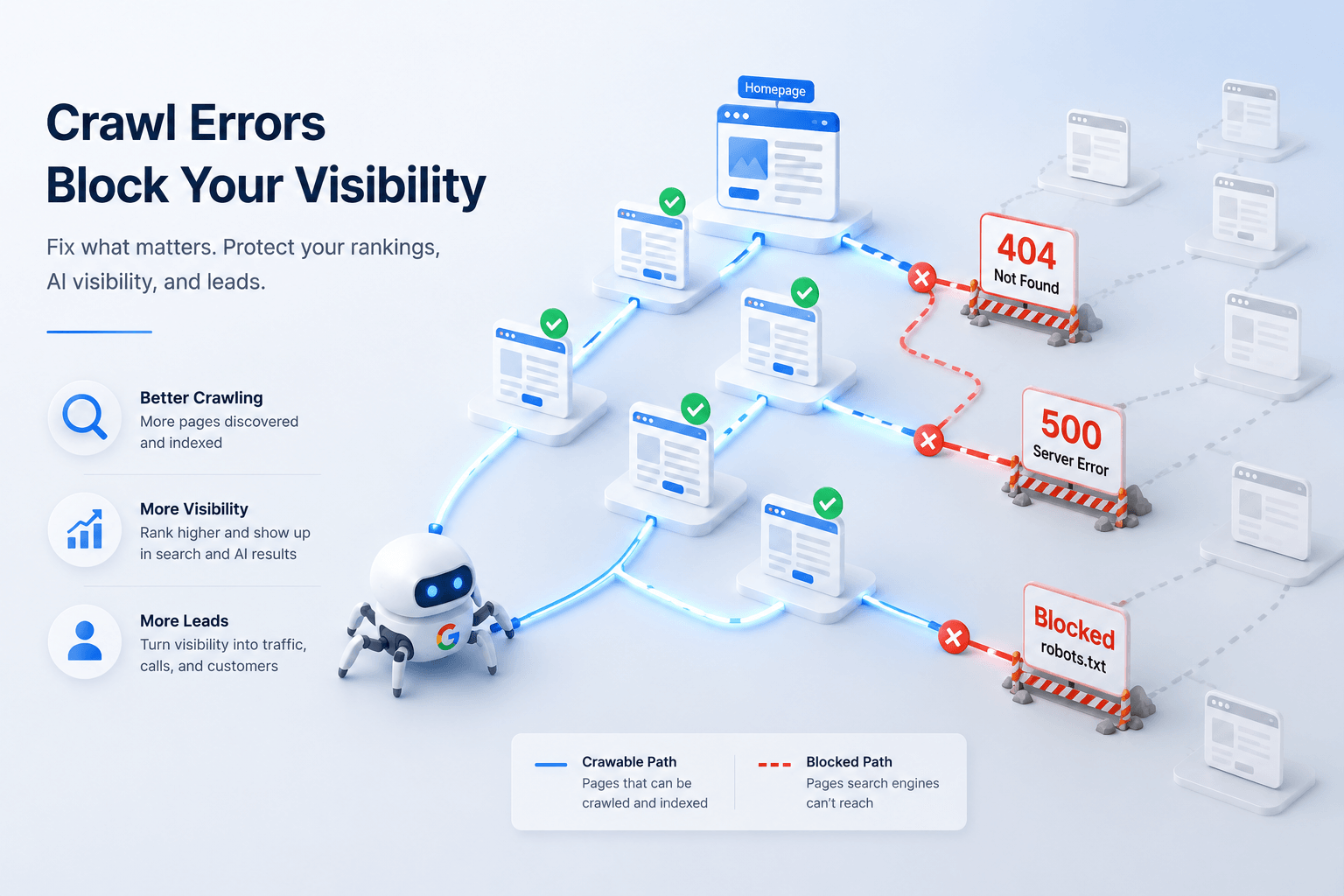
Crawl errors are not just technical housekeeping anymore
Most websites have crawl errors.
Most businesses ignore them.
That’s a problem.
Because crawl errors don’t just live inside Google Search Console.
They directly impact whether your pages:
- rank in search
- get indexed at all
- show up in AI-driven results
- and ultimately… generate leads and sales
Here’s the reality:
If Google (or any search crawler) can’t properly access your pages, those pages don’t compete.
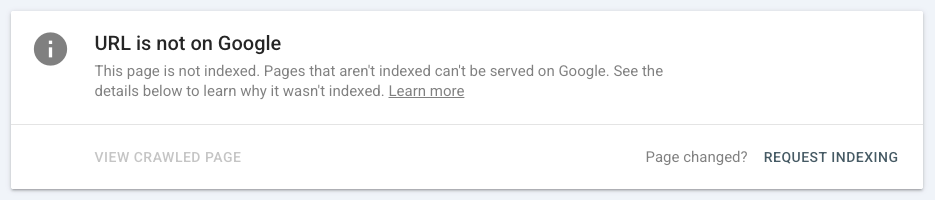
It doesn’t matter how good your content is.
It doesn’t matter how much you’ve invested in SEO.
If your most important pages aren’t being crawled, rendered, and indexed correctly, you’re losing visibility before the game even starts.
And now, that impact goes beyond traditional search.
Google’s AI experiences still rely on indexed, crawlable content.
If your pages aren’t accessible, they’re far less likely to be surfaced in those results.
So this isn’t about “cleaning up errors.”
It’s about protecting your visibility — and the traffic and revenue that come with it.
In this guide, we’ll break down the crawl errors that actually matter… and the ones you can safely ignore.
How to Spot the Crawl Errors That Actually Matter
Before you fix anything, you need to know where to look.
And more importantly… how to separate real issues from noise.
Because not every warning in an SEO tool is worth your time.
Here’s the stack we use to identify crawl problems quickly and accurately:
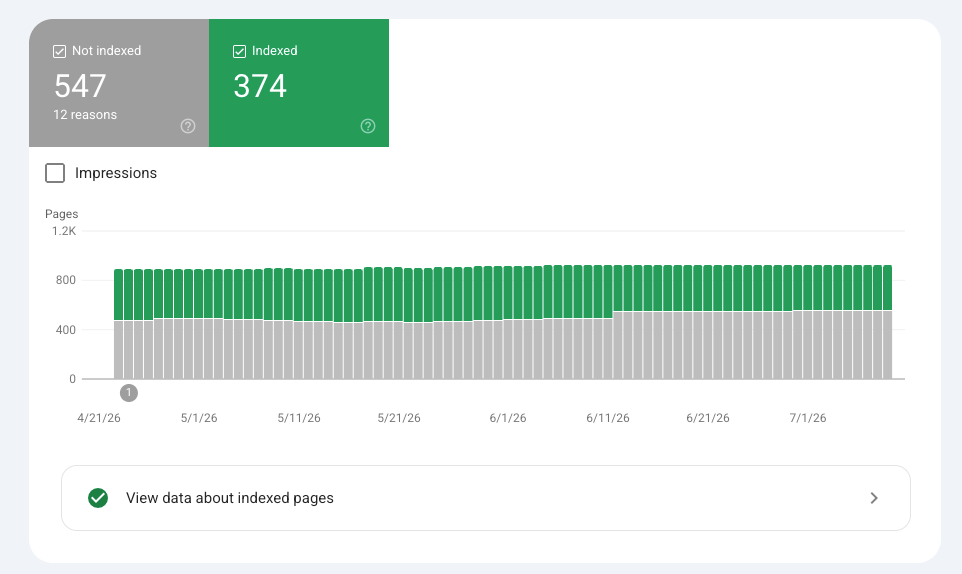
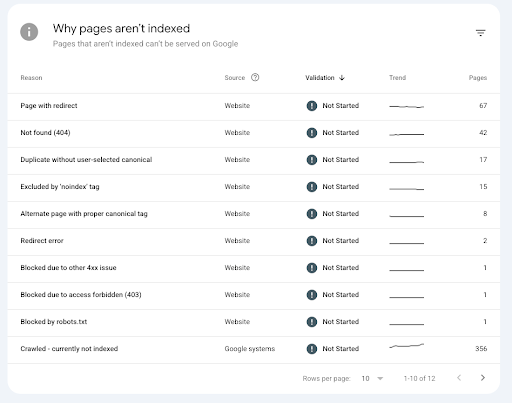
1. Google Search Console (Your Source of Truth)
Start here.
Focus on:
- Page Indexing report > shows what’s indexed, excluded, and why
- URL Inspection tool > lets you test specific pages
- Crawl Stats report > shows how Google is actually interacting with your site
This tells you what Google sees — not what a third-party tool assumes.
2. Screaming Frog (Your Primary Crawler)
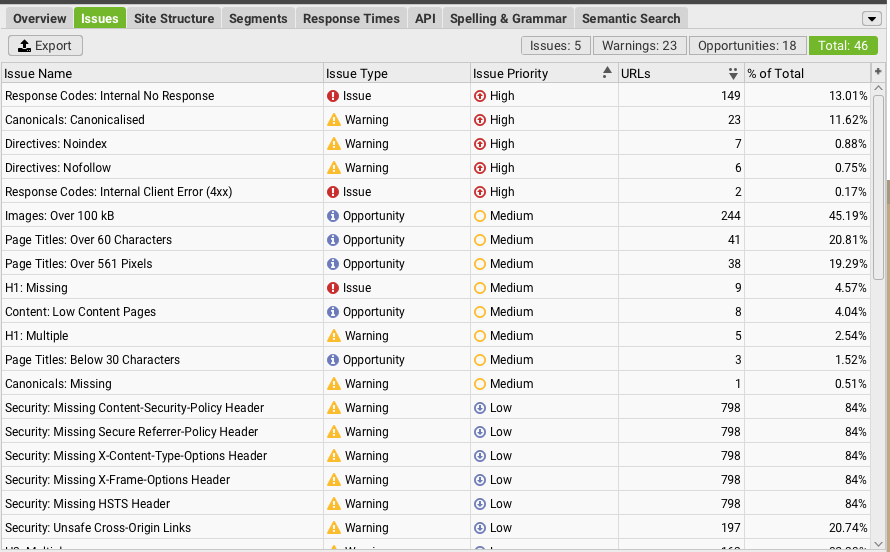
This is where patterns become obvious.
Use it to:
- find broken links, redirect chains, and loops
- identify blocked URLs
- analyze status codes at scale
- surface duplicate and low-value pages
If there’s a structural issue, Screaming Frog will expose it fast.
3. Semrush & Ahrefs Site Audits (Ongoing Monitoring)
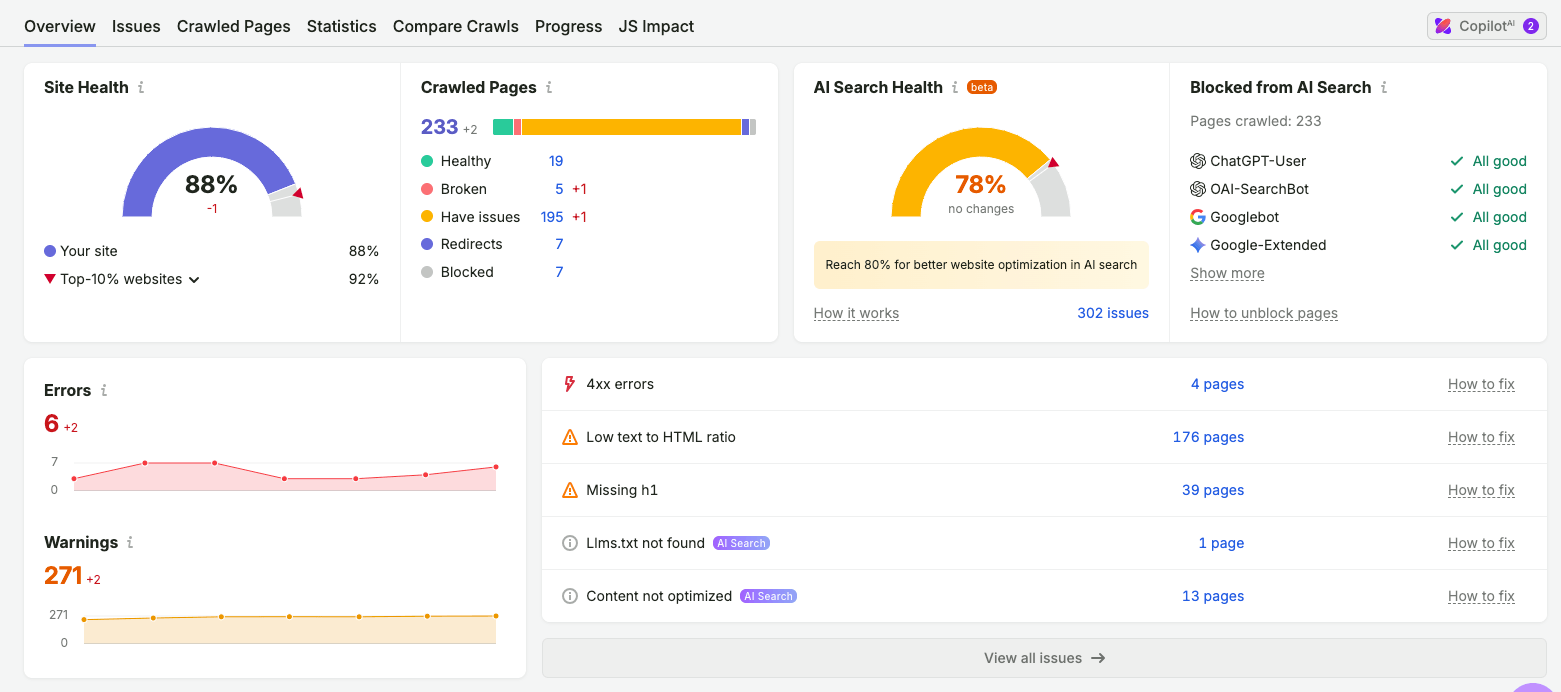
These tools are great for visibility and consistency.
Especially Semrush, since you can:
- schedule recurring audits
- get alerts when issues appear
- track improvements over time
Think of these as your monitoring layer — not your only source of truth.
4. Server Logs (When You Need the Truth)
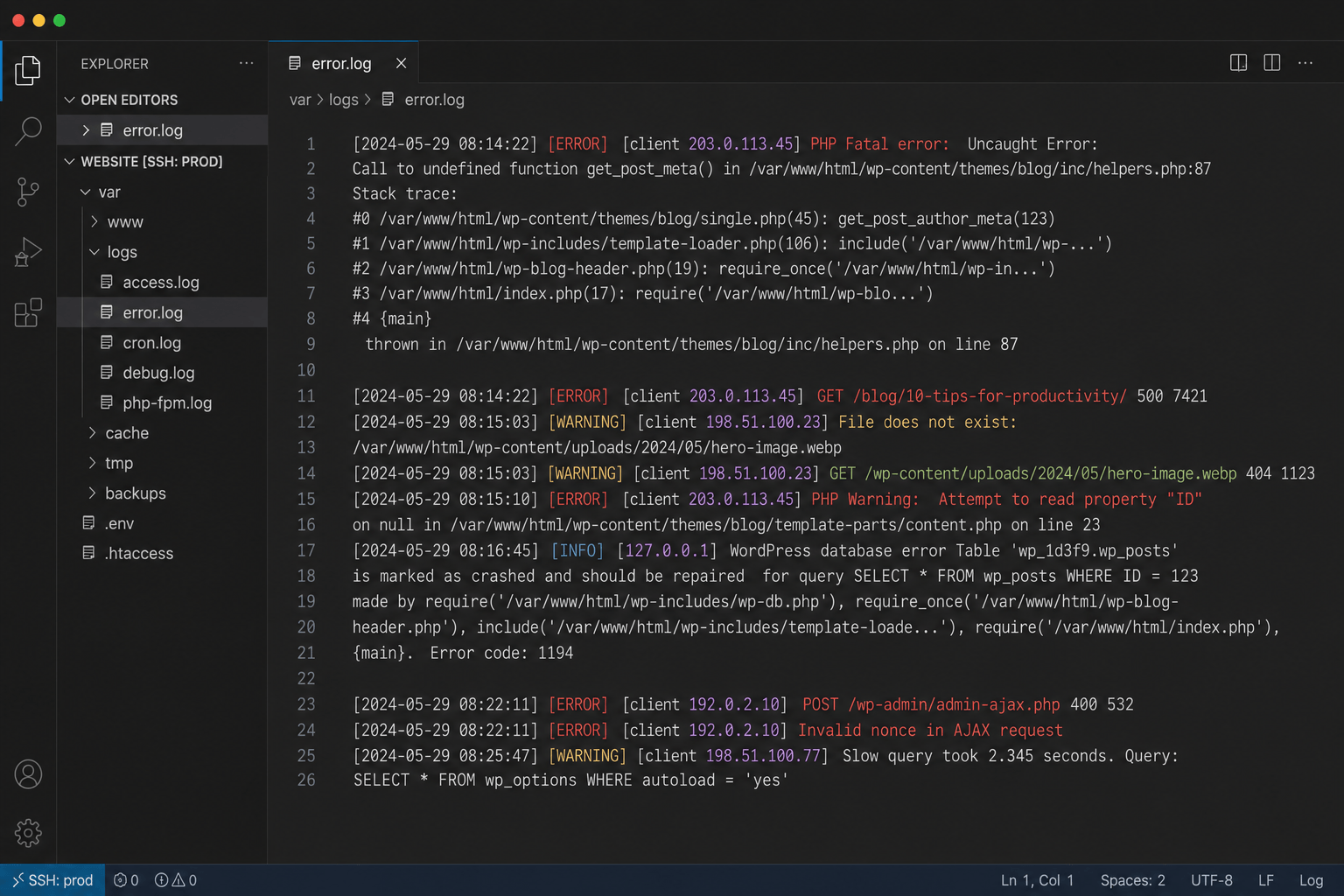
If something doesn’t add up, check your logs.
This shows:
- which bots are actually hitting your site
- how often they crawl
- what status codes they receive
This is the closest thing to “ground truth” you’ll get.
Quick reality check
You don’t need to fix everything.
You need to fix the issues that:
- block access
- break crawling
- or prevent important pages from being indexed
That’s what we’re focusing on next.
Crawl Error #1: Server Errors and Unstable Response Behavior
If your site has server errors, nothing else matters.
Seriously.
Because if your pages aren’t consistently accessible, Google can’t crawl them… which means they won’t get indexed… which means they won’t rank.
What this issue actually is
Server errors usually show up as:
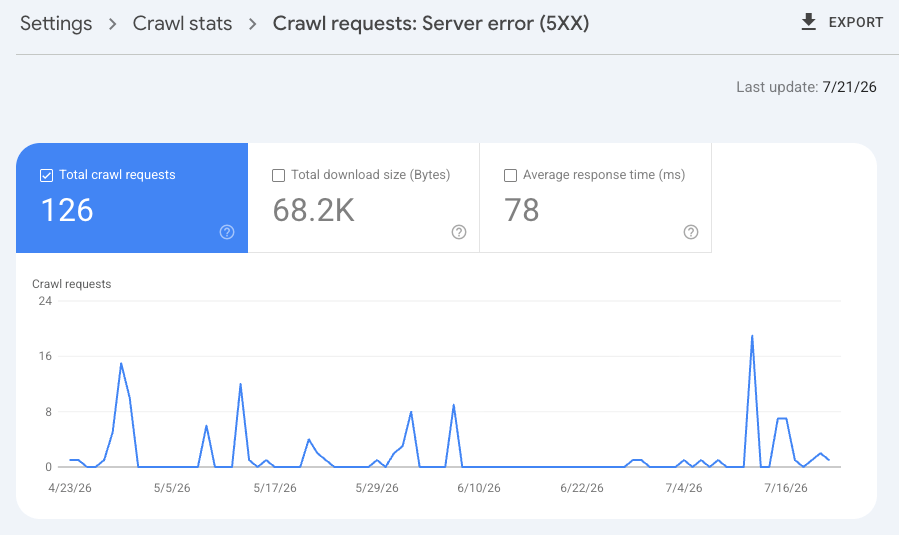
- 5xx errors (500, 502, 503, 504)
- timeouts
- DNS or hosting failures
- inconsistent or slow responses
In simple terms: your site isn’t reliably responding when crawlers try to access it.
Why it matters for SEO (and revenue)
When Google hits repeated server errors, it does two things:
- slows down crawling
- backs off your site altogether
If it continues long enough, pages can:
- drop out of the index
- stop being refreshed
- lose rankings over time
And if your key pages (services, landing pages, high-intent content) are affected?
You’re not just losing visibility.
You’re losing potential leads before they even find you.
What it looks like in the real world
You might notice:
- spikes in errors inside Google Search Console > Page Indexing
- drops in crawl activity in Crawl Stats
- pages randomly not being indexed or updated
- tools like Screaming Frog timing out or failing to crawl sections of your site
What to check first
Start with the basics:
- hosting performance > are you on a server that can handle traffic?
- recent deployments > did something break after a release?
- slow scripts or database queries > common cause of timeouts
- CDN or caching issues > misconfigurations can trigger failures
- robots.txt availability > if this file returns a server error, crawling can stall
How to fix it
Fixing this usually requires coordination with dev or hosting teams.
Focus on:
- stabilizing server response times
- eliminating recurring 5xx errors
- resolving timeout issues
- ensuring critical files (like robots.txt) are always accessible
Once fixed, request reindexing for key pages and monitor crawl activity.
Bottom line
This is not a “nice to fix” issue.
It’s a hard blocker.
If your site isn’t consistently accessible, everything else in your SEO strategy becomes less effective.
Crawl Error #2: Redirect Errors
Redirects aren’t the problem.
Bad redirects are.
And they’re one of the most common crawl issues we see across almost every site.
What this issue actually is
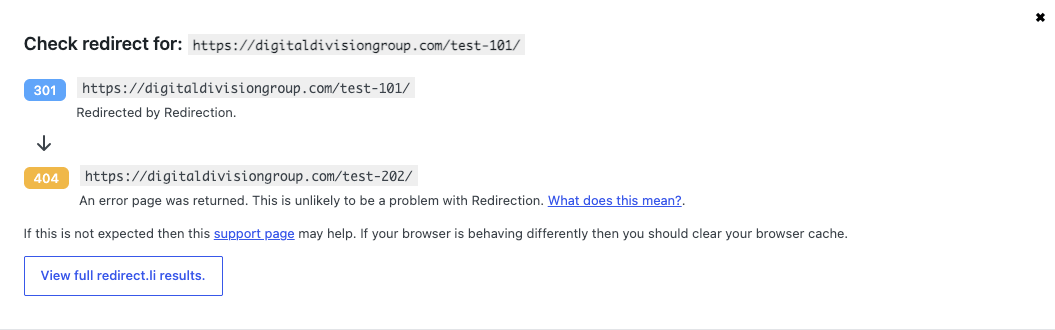
Redirect errors usually show up as:
- redirect chains (URL > URL > URL > final page)
- redirect loops (URLs pointing back to each other)
- broken redirects (redirecting to a non-existent page)
- internal links pointing to redirected URLs
Not all redirects are bad.
But when they stack up or break, they create friction for crawlers.
Why it matters for SEO (and visibility)
Every redirect adds an extra step.
And when you have chains or loops, Google has to:
- spend more time crawling
- follow multiple hops
- and sometimes… give up entirely
Over time, this can:
- slow down crawling efficiency
- dilute signals between URLs
- delay indexing of important pages
And if your internal links point to redirects instead of final URLs?
You’re making Google work harder than it needs to.
What it looks like in the real world
You might see:
- “Redirect error” in Google Search Console
- long redirect chains in Screaming Frog
- pages taking multiple hops before loading
- outdated URLs still being linked internally
This is especially common after:
- site migrations
- URL structure changes
- rebrands or CMS updates
What to check first
Focus on your highest-impact pages:
- are important pages part of a redirect chain?
- are there any redirect loops?
- do internal links point to redirected URLs instead of final ones?
- does your sitemap include redirected URLs?
How to fix it
This is usually a quick win.
- flatten redirect chains > point directly to the final URL
- remove loops entirely
- update internal links > always link to the final destination
- clean up your sitemap > only include live, indexable URLs
Bottom line
Redirects are normal.
But messy redirects create unnecessary friction.
Clean them up, and you make it easier for Google to crawl, index, and trust your site structure.
Crawl Error #3: Important Pages Blocked by robots.txt
This is one of the fastest ways to kill your SEO without realizing it.
Because when a page is blocked by robots.txt…
Google can’t crawl it.
And if it can’t crawl it, it’s very unlikely to rank.
What this issue actually is
Your robots.txt file tells search engines what they can and can’t crawl.
A typical rule might look like:
- Disallow: /admin/
- Disallow: /staging/
That’s fine.
The problem happens when important pages get blocked by mistake.
Why it matters for SEO (and AI visibility)
If a page is blocked by robots.txt:
- Google can’t access the content
- it can’t evaluate or understand the page properly
- and it’s unlikely to appear in search results or AI-driven experiences
Even worse:
If that page has a noindex tag, Google may never see it.
Because robots.txt blocks crawling… which prevents Google from reading the noindex directive in the first place.
What it looks like in the real world
You might see:
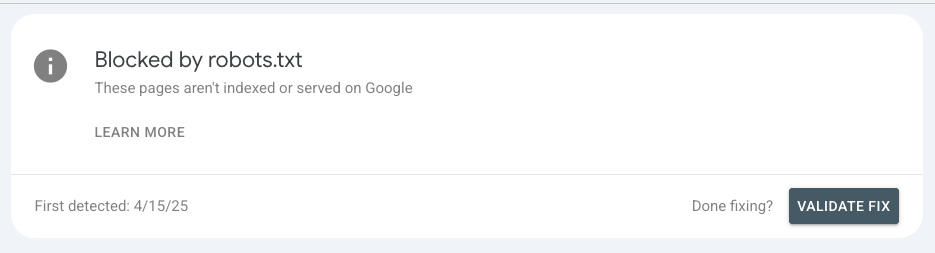
- “Blocked by robots.txt” in Google Search Console
- important pages missing from search entirely
- pages not being crawled in tools like Screaming Frog
- sudden drops in visibility after a deployment
This often happens when:
- staging rules get pushed to production
- developers block entire directories temporarily… and forget to remove it
- broad disallow rules accidentally catch important URLs
What to check first
Start here:
- open your robots.txt file manually (/robots.txt)
- look for broad rules like Disallow: / or directory-level blocks
- check if key pages (services, blog, landing pages) fall under those rules
- test specific URLs using a robots.txt tester
Useful tool: https://technicalseo.com/tools/robots-txt/
How to fix it
Fixing this is usually straightforward:
- remove or adjust the rule blocking important pages
- narrow broad disallow directives
- re-test affected URLs before pushing live
- once fixed, request indexing in Search Console
Important nuance
Robots.txt is for controlling crawling, not indexing.
If your goal is to keep a page out of search results:
- use a noindex tag
- and allow the page to be crawled
Bottom line
If important pages are blocked, they’re essentially invisible.
No crawling > no indexing > no rankings > no traffic.
Crawl Error #4: Important Pages Blocked by Auth (401/403 Errors) but
This one doesn’t always show up as clearly.
Because to you, the page might load fine.
But to Google?
It’s blocked.
What this issue actually is
These errors happen when a page returns:
- 401 (Unauthorized) > requires login
- 403 (Forbidden) > access is denied
In both cases, crawlers can’t access the content.
Why it matters for SEO (and revenue)
If Google can’t access a page, it can’t:
- crawl it
- understand it
- or index it
Which means that page won’t rank.
This becomes a real problem when it affects:
- service pages
- landing pages
- blog content
- or any page meant to drive traffic and conversions
You may think the page is live.
But if it’s behind a gate or returning the wrong status code, it’s invisible to search.
What it looks like in the real world
You might notice:
- pages not appearing in search at all
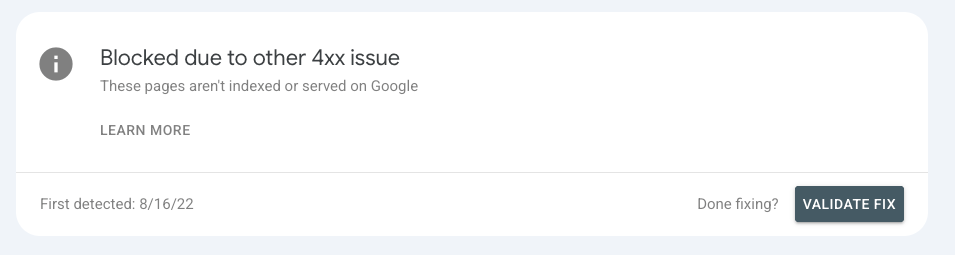
- “Blocked due to unauthorized request (401)” in Search Console
- crawling tools unable to access certain URLs
- inconsistencies between what you see and what tools report
This often happens when:
- staging or preview protections are left in place
- password protection is applied to live pages
- access rules are misconfigured during launches
What to check first
Focus on pages that should be public:
- test key URLs in URL Inspection
- check HTTP status codes (use Screaming Frog or dev tools)
- confirm pages load without login requirements
- review any CMS or hosting-level access restrictions
How to fix it
- remove login or password protection from public pages
- ensure pages return a 200 status code
- fix permission or access rule issues
- re-test and request indexing once resolved
If a page is meant to be private, this behavior is fine.
But if it’s meant to rank?
It needs to be accessible.
Bottom line
If a page requires permission, it won’t compete in search.
Make sure your important pages are open, accessible, and crawlable.
Crawl Error #5: Infrastructure Rules Blocking Bots
This is one of the most overlooked crawl issues.
Because everything can look fine on the surface…
…but behind the scenes, your infrastructure is blocking search engines.
What this issue actually is
This happens when tools like:
- CDNs (Cloudflare, etc.)
- firewalls or WAFs
- rate limiting systems
- bot protection tools
accidentally block legitimate crawlers.
Including Googlebot.
Why it matters for SEO (and AI visibility)
From your perspective, the site works.
But from Google’s perspective:
- requests get blocked
- pages return errors
- or crawling gets throttled
Which means:
- fewer pages get crawled
- updates take longer to be reflected
- important pages may never get properly indexed
And just like with other crawl issues…
If bots can’t access your content, it won’t show up in search or AI-driven results.
What it looks like in the real world
This one is tricky.
Because you might not see obvious errors in Search Console.
Instead, you’ll notice:
- crawling tools behaving inconsistently
- sudden drops in crawl activity
- pages that “should” be indexed… but aren’t
- discrepancies between what you see and what bots experience
In more severe cases:
- Googlebot gets blocked entirely or intermittently
What to check first
This usually requires a deeper look:
- review CDN and firewall settings
- check for rate limiting rules
- confirm bot protection tools aren’t too aggressive
- analyze server logs to see how bots are being treated
You’re looking for patterns where bots:
- get blocked
- get throttled
- or receive inconsistent responses
How to fix it
- allowlist verified search engine bots
- relax overly aggressive security rules
- adjust rate limits for crawler traffic
- work with your dev or hosting team to ensure consistent access
Then monitor crawl activity to confirm improvements.
Bottom line
Not all crawl issues come from your website.
Some come from the systems protecting it.
If your infrastructure blocks bots, your SEO performance will suffer — even if everything else is done right.
Crawl Error #6: Soft 404s and Wrong Status Codes
This is where Google starts guessing.
And when Google has to guess…
Things don’t get indexed the way you expect.
What this issue actually is
A soft 404 happens when a page:
- looks like an error page
- has little or no useful content
…but still returns a 200 (OK) status code.
In other words:
The page says “I’m fine”…
But everything about it says “I shouldn’t exist.”
Why it matters for SEO (and visibility)
When Google sees this mismatch, it may:
- treat the page as a soft 404
- choose not to index it
- or ignore it entirely
That creates confusion around:
- which pages should be indexed
- which pages are actually valuable
- and how your site structure is interpreted
It also wastes crawl activity on pages that don’t contribute to your visibility.
What it looks like in the real world
You might see:
- “Soft 404” in Google Search Console
- thin or placeholder pages not getting indexed
- pages with “no results found” or empty states
- URLs that exist… but don’t provide real value
This is common with:
- filtered or faceted pages
- empty category pages
- removed content that wasn’t handled properly
- CMS-generated pages with little content
What to check first
Look at pages flagged as soft 404s and ask:
- does this page actually serve a purpose?
- does it have meaningful, unique content?
- should it exist at all?
Then check:
- what status code is it returning?
- does the page match that status?
How to fix it
You’ve got three main options:
- If the page should exist
> add meaningful content and value - If the page is gone with no replacement
> return a proper 404 or 410 - If there’s a clear replacement
> use a 301 redirect to the most relevant page
The key is alignment:
- content + intent + status code should all match
Bottom line
Don’t let “fake pages” clutter your site.
If a page isn’t useful, don’t pretend it is.
Clear signals make it easier for Google to crawl, understand, and index your site correctly.
Crawl Error #7: Crawled / Discovered – Not Indexed (Duplicate & Low-Value URL Clutter)
This is where most SEO teams get stuck.
Because these statuses look serious…
…but they’re not always problems.
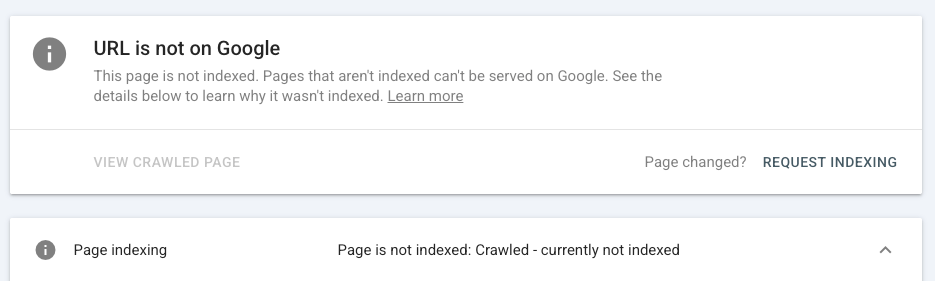
What this issue actually is
You’ll usually see two variations in Search Console:
- Crawled – currently not indexed
- Discovered – currently not indexed
Here’s the difference:
- Crawled > Google saw the page, evaluated it… and chose not to index it
- Discovered > Google knows the page exists… but hasn’t crawled it yet
Why it matters for SEO (and when it doesn’t)
This is not always an error.
In many cases, it’s a signal.
Google is essentially saying:
“This page doesn’t seem important enough to index right now.”
That usually comes down to:
- duplicate content
- low-value pages
- weak internal linking
- or too many similar URLs competing with each other
So the real issue isn’t “indexing.”
It’s priority and quality.
What it looks like in the real world
You might notice:
- large groups of similar URLs not being indexed
- blog posts or pages not appearing in search
- faceted or parameter-based URLs piling up
- inconsistent indexing across similar pages
This is especially common on sites with:
- filters and faceted navigation
- large blog libraries
- dynamically generated URLs
- poor internal linking structures
What to check first
Start by looking at patterns, not individual pages:
- are there duplicate or near-duplicate pages?
- are important pages getting enough internal links?
- is your sitemap clean and focused on key URLs?
- are low-value pages flooding your site?
How to fix it
This is about cleanup and prioritization:
- consolidate duplicates > use canonicals or redirects
- improve internal linking > point authority to key pages
- clean your sitemap > only include valuable, indexable URLs
- reduce low-value URL creation > limit unnecessary parameters or filters
If a page isn’t getting indexed, ask:
Should this page exist in the first place?
Quick note on crawl budget
You’ll hear this come up a lot.
For most sites, it’s not the main issue.
But when you create too many low-value or duplicate URLs, you:
- waste crawl activity
- and make it harder for Google to focus on what actually matters
Bottom line
Not every page needs to be indexed.
But your important pages should be.
If they’re not, it’s usually a sign that your site structure, content quality, or internal linking needs attention.
Five Crawl Report Warnings You Can Usually Ignore
Not every issue in your crawl report needs fixing.
In fact, some of them are working exactly as intended.
The problem?
Most SEO tools don’t tell you what matters… and what doesn’t.
So teams end up:
- chasing every warning
- fixing things that aren’t broken
- and wasting time instead of improving performance
Let’s clear that up.
1. Alternate Page with Proper Canonical
This one sounds scary.
It’s not.
It simply means:
- multiple versions of a page exist
- and Google chose the canonical version you specified
That’s expected behavior.
As long as:
- your canonical tags are correct
- and Google is indexing the right version
You don’t need to take action.
2. Page with Redirect
If a page redirects, Google won’t index it.
That’s the point.
This shows up when:
- an old URL redirects to a new one
- or when tools crawl non-final URLs
As long as:
- the redirect works correctly
- and points to the right destination
You’re fine.
3. Excluded by “noindex” Tag
This is doing exactly what you told it to do.
If a page has a noindex tag, Google will:
- crawl it
- and then exclude it from search results
That’s useful for:
- thank-you pages
- admin pages
- duplicate or low-value content
No action needed — unless the page should be indexed.
4. Not Found (404) for Removed Pages
404s get a bad reputation.
But they’re not inherently a problem.
If a page was intentionally removed and has:
- no replacement
- no relevant alternative
A 404 (or 410) is the correct response.
Trying to redirect everything can actually create more confusion.
5. URLs Blocked by robots.txt (When Intentional)
Blocking URLs in robots.txt is normal.
Common examples:
- admin areas
- staging environments
- internal search pages
If the block is intentional and those pages aren’t meant to be indexed:
There’s nothing to fix.
Quick reality check
These aren’t “ignore forever” issues.
They’re intentional states.
The key question is:
Was this done on purpose?
If yes, move on.
If not, investigate.
Bottom line
A clean report doesn’t equal better SEO.
Fixing the right issues does.
Focus on:
- accessibility
- crawlability
- and indexability of important pages
And stop wasting time on warnings that don’t impact performance.
Fix Blockers, Not Noise
Crawl errors aren’t the problem.
Misprioritization is.
Most websites don’t struggle because they have errors.
They struggle because they’re fixing the wrong ones.
If you take one thing from this guide, let it be this:
Not all crawl issues are created equal
Some are harmless.
Some are intentional.
And some quietly block your most important pages from ever performing.
The goal isn’t to have a perfect report.
It’s to make sure:
- your key pages can be crawled
- your content can be indexed
- and your site is easy for search engines to understand
Because that’s what drives:
- rankings
- visibility (including AI-driven search)
- and ultimately… leads and revenue
When you focus on the right issues:
- you remove friction from crawling
- you help Google prioritize what matters
- and you give your best pages a real chance to compete
Where most teams get stuck
They:
- chase every warning in a tool
- over-optimize low-impact issues
- and miss the problems that actually move the needle
That’s where having the right strategy matters.
Need help identifying what’s actually holding your site back?
This is exactly where most businesses hit a wall.
Because diagnosing crawl issues isn’t just about tools.
It’s about knowing:
- what matters
- what doesn’t
- and what to fix first
That’s where we come in.
At Digital Division, we don’t just audit your site.
We help you:
- prioritize the issues that impact performance
- fix the technical blockers holding you back
- and align your SEO with real business outcomes
Request a free SEO audit and we’ll show you exactly where your site is losing visibility — and how to fix it.
Frequently Asked Questions About Crawl Errors and SEO
What’s the difference between a crawl error and an indexing issue?
A crawl error happens when search engines can’t properly access a page.
An indexing issue happens when a page is crawled… but not added to Google’s index.
In short:
- Crawl issue > Google can’t access the page
- Indexing issue > Google accessed it but chose not to include it
Both can impact visibility, but crawl issues are usually more critical because they block access entirely.
Do 404 errors hurt SEO?
Not always.
A 404 is the correct response when a page has been intentionally removed and has no replacement.
It only becomes a problem when:
- important pages return 404s by mistake
- or valuable URLs are lost without proper redirects
Trying to redirect every 404 can actually create confusion. The key is using the right response for the situation.
Should I use robots.txt or noindex?
It depends on your goal.
- Use robots.txt to control crawling
- Use noindex to keep pages out of search results
Important nuance:
If a page is blocked by robots.txt, Google may never see the noindex tag.
So if you want a page removed from search:
- allow crawling
- and use a noindex tag
How long does it take Google to fix crawl errors?
It depends on the issue and how often your site is crawled.
After fixing an issue:
- Google may recrawl within a few days for high-priority pages
- for lower-priority pages, it can take weeks
You can speed things up by:
- requesting indexing in Search Console
- improving internal linking to the page
Do crawl errors affect AI search results like AI Overviews?
Yes.
AI-driven search experiences still rely on crawlable and indexable content.
If your pages:
- can’t be crawled
- or aren’t indexed
They’re far less likely to appear in:
- AI Overviews
- AI-powered search tools
- or other generative search experiences
Fixing crawl issues improves your chances of being included.
What should I check first in Google Search Console?
Start with:
- Page Indexing report > to see what’s excluded and why
- URL Inspection tool > to test specific pages
- Crawl Stats report > to understand crawl activity trends
This gives you a clear picture of what Google is actually seeing.
Which tool is best for finding crawl errors?
No single tool does everything.
The best approach is a combination:
- Google Search Console > what Google sees
- Screaming Frog > technical crawl insights at scale
- Semrush / Ahrefs > monitoring and alerts
- server logs > what’s actually happening behind the scenes
Each tool gives you a different piece of the puzzle.
DIGITAL MARKETING SOLUTIONS
Relax.
You've got a digital marketing partner.
Digital Division is a marketing agency with solutions that can help you generate leads and transform your business.